AI Agent for QGIS: Top Score on Google's Geospatial Benchmarks
Published

AI Agent for QGIS scores higher than every other AI agent we tested on Google's two geospatial benchmarks.
It works inside QGIS the way a GIS analyst does. Ask it a question in plain words about flood risk, travel times or water stress. It finds the data, runs the analysis and draws the map in your project.
- AI Agent QGIS plugin
- Claude + QGIS MCP
- GPT-6 Luna + QGIS MCP
Accuracy from 0 to 100 on GeoKTools and GeoExpertQueries, Google Research's benchmarks for geospatial agents (arXiv:2610.15750): the 41 held-out questions with no link to our tuning, graded by Google's own scoring code, mean of 3 runs. The plugin at Low effort, the setting on the free plan. The highest score of every agent we tested; details in How we tested.
The difference is what we built around the model. The plugin gives it its own tools for geospatial work, licensed data it is allowed to use and a check on every result before it answers, all connected directly to QGIS. Without them, the same model scores far lower, as the one model, three ways chart shows.
What it can do
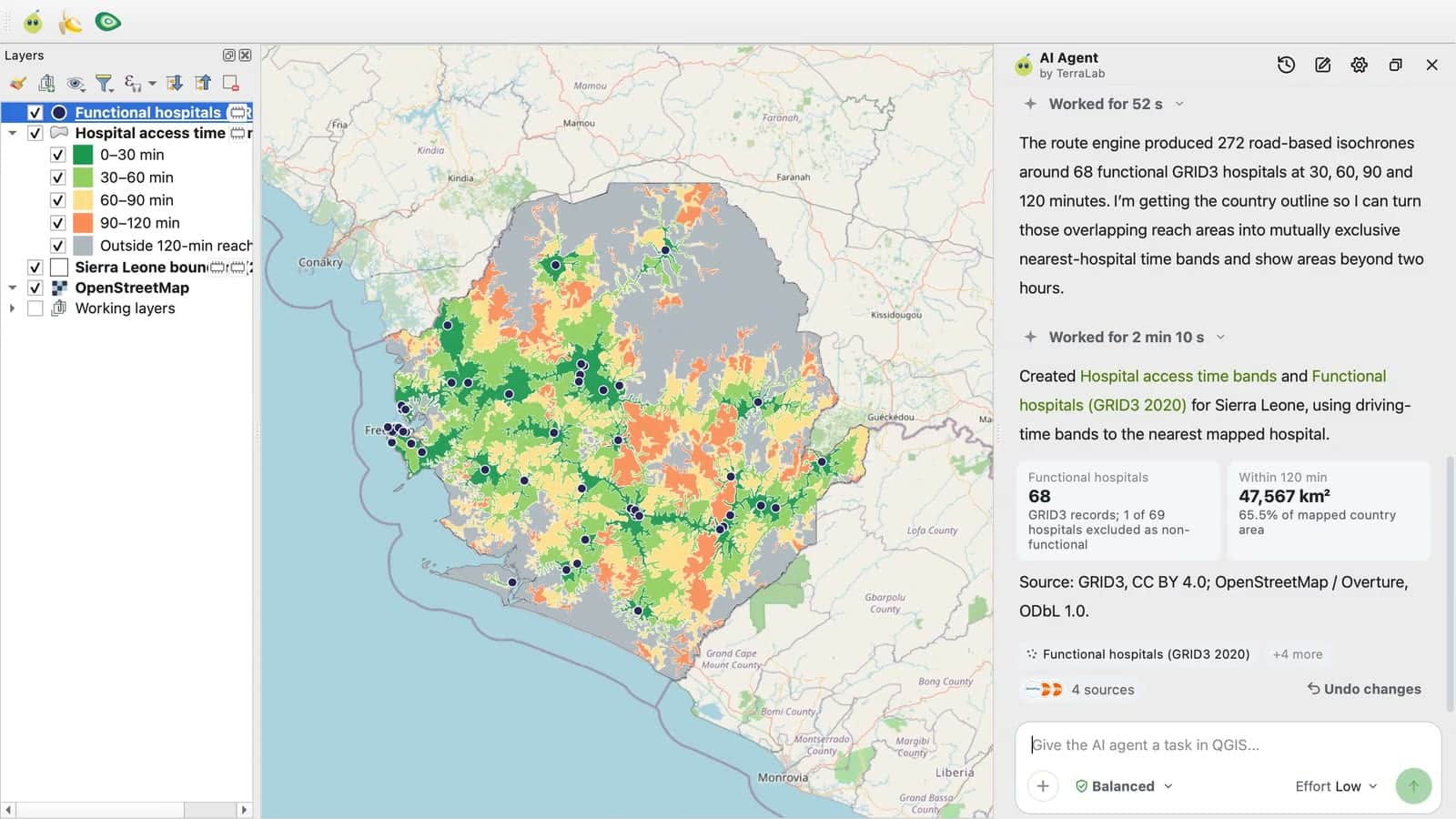
Three questions, each filmed from an empty QGIS project on Low effort, the setting on the free plan. The first comes from Google's paper. We wrote the other two in the same style, and none of them is among the scored questions.
- Question
- Map the travel time for a pregnant woman to reach the nearest hospital for an emergency delivery, from anywhere in Sierra Leone. Use travel time, not straight-line distance.
- Answer
- The plugin first asked how people travel and which facilities should count. With driving, and every mapped hospital as a stand-in, it mapped the time to the nearest of 68 hospitals in 30-minute bands: 65.5% of the mapped country lies within two hours. About 5 minutes.
- Why it is hard
- It needs road travel time across a whole country, not straight-line distance, and a choice about which facilities count that no model can make from memory.
- Question
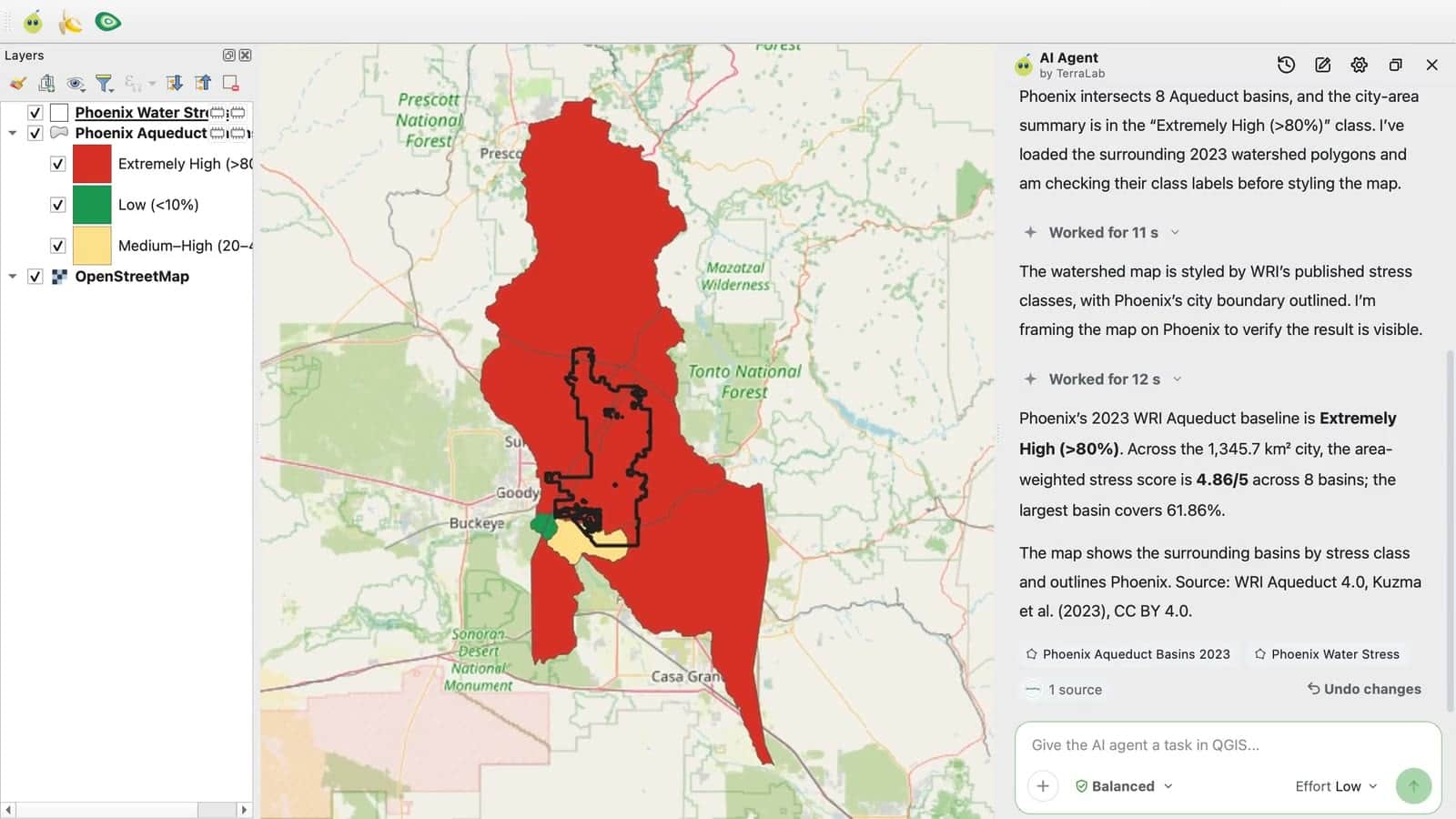
- How water-stressed is the area around Phoenix, Arizona? Give the WRI Aqueduct baseline water stress there and show it on the map.
- Answer
- Extremely High, above 80%. The 8 WRI Aqueduct basins that cross the city give an area-weighted score of 4.86 out of 5, with the source and its licence named. About a minute.
- Why it is hard
- The answer has to come from one named dataset, combined over every basin the city overlaps, not from what a model remembers about Phoenix.
- Question
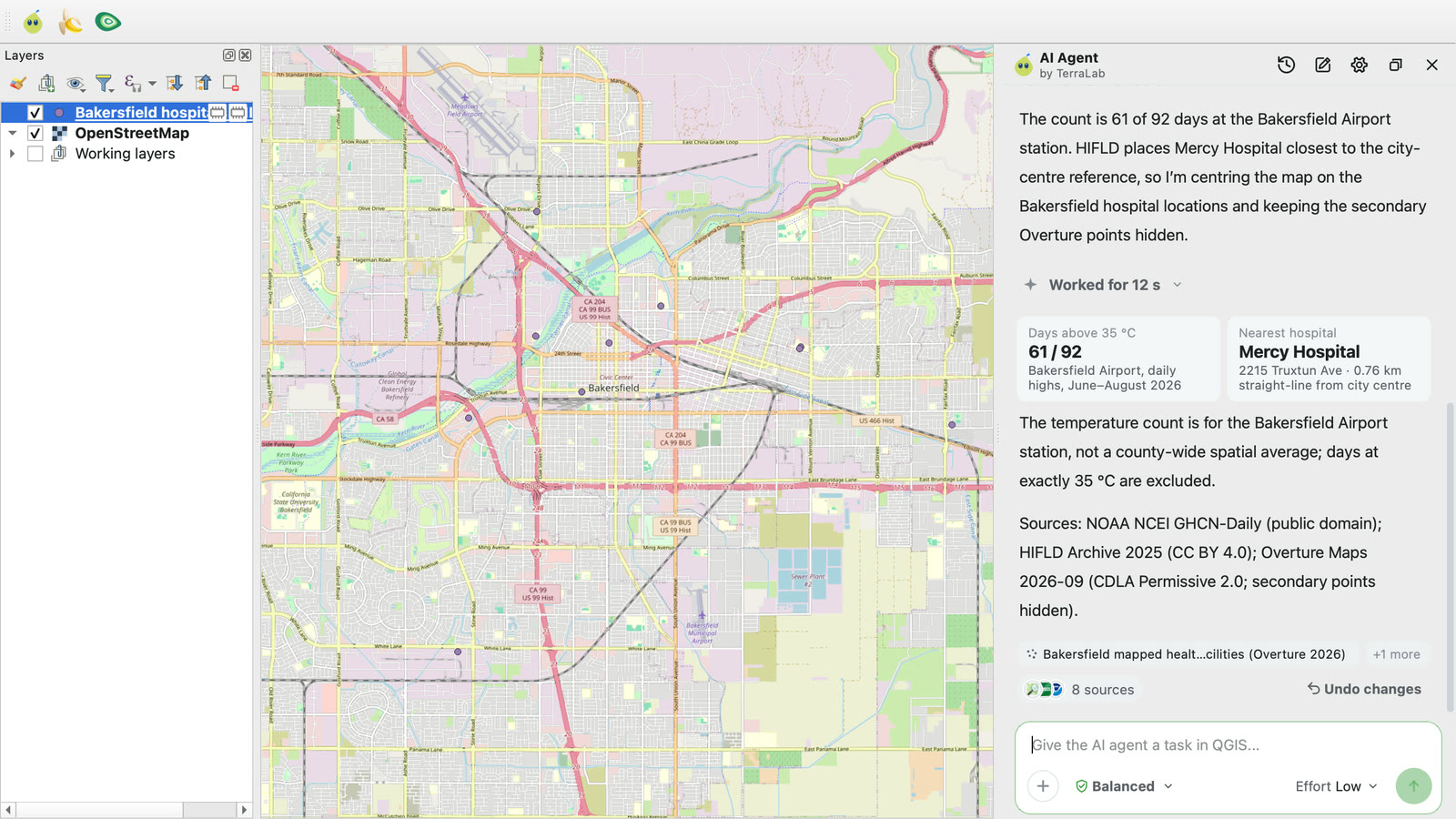
- How many days went above 35 °C in Kern County, California last summer (June to August 2026)? And which hospital is nearest to Bakersfield, the county seat?
- Answer
- 61 of 92 days above 35 °C at the Bakersfield airport station, with a note that this is one station, not a county average. The nearest hospital is Mercy Hospital, 0.76 km from the city centre. About 2 minutes.
- Why it is hard
- It joins three sources, daily weather records, a hospital register and a map of places, for a summer too recent to answer from memory.
Why it beats a model with a QGIS MCP, or a model alone
A language model on its own answers from memory. Connected to QGIS through a general-purpose MCP server, it can operate QGIS, but it still has to find the data, choose each step and check its own work.
The AI Agent QGIS plugin gives the model what it needs for geospatial work: tools made for GIS, licensed data it is allowed to use, and a check on every result before it answers. It works directly inside QGIS, so the model acts on real layers with real QGIS tools, and you can open every result in your project.
The clearest proof is one model, three ways. On its own, GPT-6 Luna recalls some GeoKTools answers and scores 0 on every expert task. Connected to QGIS through a general MCP server, it scores about the same. Inside the plugin, at Low effort, the same model scores far higher on both benchmarks.
- GPT-6 Luna alone
- GPT-6 Luna + QGIS MCP
- AI Agent QGIS plugin
GeoKTools with Google's deterministic scorer, GeoExpertQueries with its autorater. The QGIS MCP run used a different server and client than the Claude run (see How we tested). The plugin's Low effort runs GPT-6 Luna.
The plugin leads at every level of difficulty. Each GeoKTools question needs several kinds of data: a boundary, a statistic, a weather record, a count of places. With two kinds, it scores well ahead of every other system. With four, every system struggles, and the plugin stays ahead.
- AI Agent QGIS plugin
- Claude + QGIS MCP
- GPT-6 Luna + QGIS MCP
- GPT-6 Luna alone
- AI Agent, live data
Scored with Google's report protocol, on the 30 held-out GeoKTools questions with no link to our tuning: 20 need two data types, 5 need three and 5 need four. Every question needing one came from a template we studied before the split, so that group is left out.
Benchmark results
Google Research built two benchmarks to test geospatial AI agents. GeoKTools asks factual questions that need real geospatial data to answer. GeoExpertQueries asks open problems an analyst would get, scored against workflows written by experts.
| AI Agent QGIS plugin | Claude + QGIS MCP | GPT-6 Luna + QGIS MCP | GPT-6 Luna alone | AI Agent, live data | |
|---|---|---|---|---|---|
GeoKTools Google's deterministic offline scorer Deterministic scorer | 53.5Low effort | 33.3 | 39.5 | 44.2 | – |
GeoKTools Google's report protocol: exact match, else Gemini 3.8 Flash judge Google's report protocol | 36.9Low effort | 23.3 | 27.0 | 28.7 | – |
GeoExpertQueries Tool-agnostic autorater, Gemini 3.8 Flash, 3 judge runs Autorater, 3 judge runs | 62.6Low effort | 29.3 | 8.6 | 0.0 | – |
All 41 questions Both benchmarks, Google's report protocol Google's report protocol | 43.8Low effort | 24.9 | 22.1 | 21.0 | – |
Mean of 3 runs per system. We ran the plugin at Low and at High effort; Low scored higher on both benchmarks, so every row shows Low. Bold marks the best score in each row.
The lead is broad: question by question, the plugin scored higher than Claude on 26 of the 41 and lower on 5, and higher than GPT-6 Luna with a QGIS MCP on 24 and lower on 7.
- Higher
- Tie
- Lower
For each question, the plugin's average over 3 runs compared with Claude's. All at Low effort.
- AI Agent QGIS plugin
- Claude + QGIS MCP
- GPT-6 Luna + QGIS MCP
Google's deterministic scorer. Each type has 3 to 5 questions, so one question moves its score a lot. The plugin leads Claude on every type except forecast flooded areas, which no system answers. GPT-6 Luna with a QGIS MCP is one point ahead on places in a ring. The two types we studied before the split, water stress around a point and extreme point of an area, are left out.
- AI Agent QGIS plugin
- Claude + QGIS MCP
- GPT-6 Luna + QGIS MCP
Google's tool-agnostic autorater. Public health has only 2 questions, so one question moves its score a lot; the plugin and Claude tie there, and GPT-6 Luna alone scored 0 in every domain.
Other benchmarks
We also ran AI Agent on two public benchmarks from outside Google, with nothing in AI Agent tuned for either. Our own code graded every answer against each benchmark's reference answers. No other agent ran under the same conditions, so there is no head-to-head here.
GeoBenchX
GeoBenchX asks for multistep GIS work on open data: merge tables, process layers and map countries, cities and regions. Some tasks ask for something the data cannot give, and the right answer is to say so. AI Agent passed 62.8% of 160 tasks on average over two runs.
- AI Agent QGIS plugin
Graded by code against the benchmark's replayed reference solutions, with no AI judge. The overall score is the mean of two runs, 65.0% and 60.6%; the other two rows come from the first run. GeoBenchX's own results and Axis Spatial's table grade with an AI judge on a different set of tasks, so we don't set our score next to theirs.
GS-QA2
GS-QA2 asks spatial questions about places in the United States: the nearest feature, a direction or a distance, the slope, aspect or elevation of the ground. Each reference answer comes from a fixed OpenStreetMap snapshot and elevation model. Given that same data, AI Agent scores 61.1 out of 100. From today's live data it scores 22.0, because places added, renamed or redrawn since the snapshot no longer match the reference. GPT-6 Luna on its own, the model AI Agent runs at Low effort, scores 15.1.
- AI Agent QGIS plugin
- AI Agent, live data
- GPT-6 Luna alone
Score from 0 to 100, mean over the benchmark's 49 question templates, 3 runs. Graded by code with the paper's tolerances, no AI judge. Axis Spatial publishes GS-QA2 scores in the same data setting, but on a different draw of questions and with a private checker, so they are not like for like.
Availability
The AI Agent QGIS plugin is free on the official QGIS plugin repository, for QGIS 3.28 and later, QGIS 4 included. In QGIS, open Plugins, then Manage and Install Plugins, search for AI Agent by TerraLab, install it and sign in. You need no API key and no card.
The free plan includes 5 tasks a month on Low effort, the setting behind every score above. Medium and High effort come with Pro. The complete guide walks through a first task.
How we tested
- Google Research published GeoKTools and GeoExpertQueries with their paper (arXiv:2610.15750), along with practice questions; it keeps its official test questions private. This is our own run on the public questions, not a Google leaderboard.
- We improved the agent on half of the public questions and measured it on the other 50, split by question template. Before that split, while exploring the benchmark, we had studied two templates with their answers. Nine of the 50 questions come from them, so we left those out: every score here is on the other 41, the held-out questions with no link to our tuning.
- Every system got the same questions, the same instructions and limits, an empty QGIS project and 3 tries. Google's own scoring code graded every answer.
- We ran the plugin at Low effort (GPT-6 Luna, on the free plan) and at High effort (a different model that plans deeper, on Pro). Low scored higher on both benchmarks, so every score shown is Low.
- Claude Sonnet 5.5 ran in Claude Code with the QGIS MCP plugin by nkarasiak, version 0.15.1, with its own shell, web and file tools off, on 18 October. GPT-6 Luna + QGIS MCP ran in OpenAI's Codex CLI with the qgis_mcp server by jjsantos01, on 16 and 17 October. GPT-6 Luna alone answered with no tools.
- Across all 41 questions, the plugin's lead over Claude holds with 95% confidence: between 10 and 29 points under Google's report protocol, at Low effort.
Technical details
Benchmarks: GeoKTools and GeoExpertQueries from google-research/geospatial-reasoning-benchmarks, commit c21a6d95, data under CC BY 4.0. The public dev split (85 GeoKTools, 25 GeoExpertQueries questions) was cut in two by question template; the held-out half has 39 GeoKTools and 11 GeoExpertQueries questions. Before the split, we had checked the reference answers of two GeoKTools templates, extreme point of an area and water stress around a point; their 9 questions fell in the held-out half and are left out of every score, which leaves 30 GeoKTools and 11 GeoExpertQueries questions. Each system got Google's prompt prefix, at most 100 model calls and 30 minutes per question, and 3 full runs; a failed or timed-out run scores 0. Scorers, unchanged: GeoKTools deterministic scorer (10% tolerance on numbers, partial credit, ROUGE-L on text); GeoKTools report protocol (exact match, otherwise a Gemini 3.8 Flash judge); GeoExpertQueries tool-agnostic autorater (Gemini 3.8 Flash, 3 judge runs per answer). The 95% interval is a paired bootstrap over questions. Runs: the plugin at Low and High effort on 20 October 2026; Claude + QGIS MCP on 18 October; GPT-6 Luna alone on 19 October. Every trial's tool calls were checked for reads of the benchmark repository, its question file or the paper, and a hit scores 0: the plugin had none, the GPT-6 Luna + QGIS MCP runs had 2. Failed, refused or timed-out trials score 0 and stay in the averages (7 of 150 for GPT-6 Luna + QGIS MCP, none of the plugin's 150 at Low).
GeoBenchX: Solirinai/GeoBenchX at commit 0edf6109, MIT licence, 202 tasks, described in arXiv:2503.18129. We left out 23 tasks excluded by a published audit, 3 control questions, and 16 whose reference solution does not reproduce or asks for a figure the reference does not compute, leaving 160. AI Agent ran each task in two separate runs at Low effort on 20 October 2026, in QGIS, with the task's data in a folder beside an empty project: 65.0% (95% interval 56.9 to 72.5) and 60.6%. In the first run it solved 46 of the 92 tasks that have an answer, declined 55 of the 62 that cannot be solved and passed 3 of the 6 that accept either. Graded by code, with no AI judge, against the replayed reference solution: the values the map shows, feature counts, the number the answer states, or no map at all for tasks that cannot be solved.
GS-QA2: Zoe/GS-QA2 at revision 0ccf9453, by Shang et al. (UC Riverside), ODbL 1.0, © OpenStreetMap contributors; ASTER GDEM is a product of METI and NASA. 245 questions, 5 from each of 49 templates, drawn with the same rule as Axis Spatial's table but not the same questions. Three settings, 3 runs each: AI Agent at Low effort with the benchmark's OpenStreetMap tables and ASTER elevation, cut to the questions' areas, in a folder beside an empty project, the prompt saying only where the data is (61.1, 95% interval 57.1 to 65.2); AI Agent at Low effort from an empty project on live data (22.0, 19.0 to 25.2); GPT-6 Luna alone, one call with no tools (15.1, 12.2 to 18.1). The final answer is checked against every reference row with the paper's tolerances: names by token overlap, locations within 5 m, bearing, aspect and slope within 5°, elevation within 10 m, distances, areas and counts within 5%.
FAQ
What is the best AI agent for QGIS?
Of the agents we tested on Google's GeoKTools benchmark, the AI Agent QGIS plugin by TerraLab scored highest: 53.5 out of 100 on 30 held-out questions, against 33.3 for Claude Sonnet 5.5 with a QGIS MCP server, 39.5 for GPT-6 Luna with a QGIS MCP server and 44.2 for GPT-6 Luna alone. It is a free plugin on the official QGIS plugin repository.
What is a geospatial AI agent?
An AI system that answers questions about places by working with real geographic data. It finds datasets, runs spatial analysis such as travel times, overlays or statistics per area, and returns a map with its sources. The AI Agent QGIS plugin by TerraLab does this inside QGIS, so every result is a layer in your own project.
Why does the AI Agent QGIS plugin score higher than a model on its own?
Because of what the plugin builds around the model: tools made for geospatial work, licensed data and a check on each result, all directly inside QGIS. GPT-6 Luna with no tools scored 44.2 on GeoKTools and 0 on GeoExpertQueries. At Low effort, which runs that same model, the plugin scored 53.5 and 62.6.
What are Google's geospatial reasoning benchmarks?
GeoKTools and GeoExpertQueries, published by Google Research in October 2026 (arXiv:2610.15750). GeoKTools asks factual questions whose answers need one to four kinds of geospatial data. GeoExpertQueries asks open analyst problems, scored against workflows written by experts. Google keeps their test splits private.
Is the AI Agent QGIS plugin better than Claude with a QGIS MCP server?
On these benchmarks, yes. On GeoKTools it scored 53.5 against 33.3 for Claude Sonnet 5.5 with the nkarasiak QGIS MCP server, and 62.6 against 29.3 on GeoExpertQueries. Across all 41 questions it scored higher on 26 and lower on 5; its lead is 19 points on average and holds with 95% confidence.
Is the AI Agent QGIS plugin better than GPT with a QGIS MCP server?
On these benchmarks, yes. GPT-6 Luna driving QGIS through a QGIS MCP server in OpenAI's Codex scored 39.5 on GeoKTools and 8.6 on GeoExpertQueries, about what the same model scores with no tools at all. The plugin scored 53.5 and 62.6, and higher on 24 of the 41 questions.
How does AI Agent do on other geospatial benchmarks?
On GeoBenchX, a public benchmark of multistep GIS tasks, it passed 62.8% of 160 tasks over two runs. On GS-QA2, spatial questions about US places checked against a fixed map snapshot, it scored 61.1 out of 100 with the benchmark's own data. Both are our own measurements at Low effort; no other agent ran under the same conditions.
Is the AI Agent QGIS plugin free?
Yes. The free plan includes 5 tasks a month on Low effort, the setting behind the GeoKTools scores here. In QGIS, open Plugins, then Manage and Install Plugins, search for AI Agent by TerraLab and sign in. You do not need an API key.