Geocoding in QGIS: 5 Free Ways Compared on Real Addresses
Published
Geocoding turns a list of addresses into points on a map. In QGIS, the free built-in route is the Batch Nominatim geocoder in the Processing Toolbox: load your CSV, pick the address field, run. It sends one address at a time to OpenStreetMap's Nominatim. For US addresses, the US Census batch geocoder found more of them. For French addresses, the national address base (BAN) beat everything else we tried. You can also type the task in one sentence to AI Agent.
 , the free built-in route is the Batch Nominatim geocoder in the Processing Toolbox: load your CSV, pick the address field, run. It sends one address at a time to OpenStreetMap's Nominatim. For US addresses, the US Census batch geocoder found more of them. For French addresses, the national address base (BAN) beat everything else we tried. You can also type the task in one sentence to
 We geocoded 100 US schools and 100 French schools whose official coordinates are public, and measured how far each answer landed:
| Route | Addresses | Found | Median error | 90% within | Time for 100 |
|---|---|---|---|---|---|
| BAN, Géoplateforme CSV | France only | 100 | 8 m | 77 m | 0.5 s |
| US Census batch geocoder | US only | 87 | 128 m | 342 m | 1.9 s |
| Batch Nominatim geocoder (built in) | Worldwide | 81 US, 92 FR | 95 m US, 46 m FR | 465 m US, 264 m FR | 148 s |
| AI Agent, one sentence | Worldwide | 93 US, 100 FR | 184 m US, 45 m FR | 2,880 m US, 283 m FR | about 1 min |
| AI Agent, asked to use the BAN | France only | 99 | 7 m | 70 m | about 8 min |
The test: 200 schools with official coordinates
A geocoding guide without a measurement is a guess. So every number here comes from runs on 19 October 2026:
- 100 US public schools drawn at random from the NCES school locations file (2023-24). NCES estimates each point from the reported address and reviews them by hand.
- 100 French public schools drawn at random from the Ministry of Education directory, all located at house-number precision.
We kept only the street address, postcode and town, never the school name, so no geocoder could find the school as a named place. The error is the straight-line distance between the returned point and the published one.
One caveat for France. 44 of the 100 BAN points sit within 1 metre of the ministry point, so the ministry clearly places schools on BAN address points. For France, read the BAN numbers as "you get the official point", not as an independent accuracy test.
Method 1: The built-in Batch Nominatim geocoder
QGIS has shipped a batch geocoder since version 3.20. It uses Nominatim, the free geocoder of OpenStreetMap, and keeps to its limit of one request per second.
Load the addresses
Layer > Add Layer > Add Delimited Text Layer…, pick your CSV and set Geometry definition to No geometry (attribute only table).
Build one address field
The tool reads a single field. Open the Field Calculator and create a text field full_address with an expression such as "address" || ', ' || "city" || ', ' || "state" || ' ' || "zip".
Run the geocoder
Open the Processing Toolbox (Ctrl+Alt+T), search Batch Nominatim geocoder, pick the table in Input layer and full_address in Address field, then run.
Check the misses
The output keeps every row and adds the fields Nominatim returned, such as display_name, class, type and postcode. Rows without a match have no geometry. Filter them and fix the addresses.
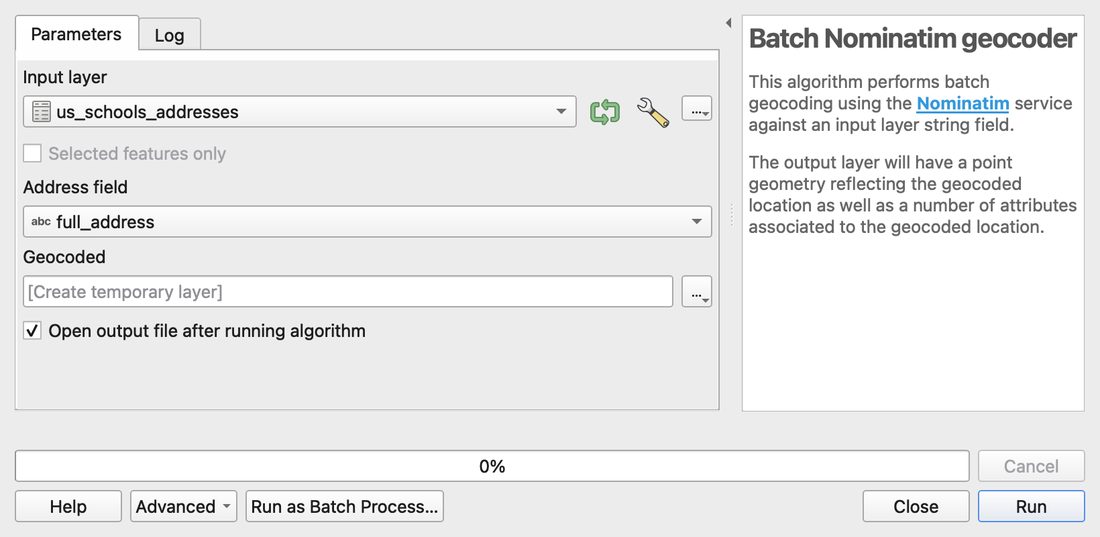
On our US list, it found 81 of 100 addresses in 148 seconds, with a median error of 95 m. The same service found 92 of the 100 French addresses, with a 46 m median. The time is set by the rate limit, so 1,600 addresses take about 40 minutes.
Use it when: you have a few hundred addresses anywhere in the world and want to stay inside QGIS.
Skip it when: you have tens of thousands of rows. The Nominatim policy discourages bulk geocoding and asks you to cache results. A national geocoder or your own Nominatim server is the better route.
Method 2: MMQGIS Geocode CSV with web service
MMQGIS is a long-standing community plugin. Its Geocode CSV with Web Service tool reads a CSV directly, with up to four address columns (address, city, state, country), so you skip the Field Calculator step.
It offers several services: OpenStreetMap / Nominatim and the US Census Bureau are free, while Google needs an API key. It also writes a Not Found CSV with every row it could not place, which is the file you will work on next.
Use it when: your addresses sit in separate columns, or you want the US Census service without leaving QGIS.
Skip it when: you only have a handful of addresses. The locator bar below is faster.
Method 3: The US Census batch geocoder
For US addresses, the Census Bureau runs a free geocoder with a batch mode of up to 10,000 addresses per file.
- Save a CSV with no header and five columns: ID, street, city, state, ZIP.
- Upload it at https://geocoding.geo.census.gov/geocoder/ under Address Batch, with the benchmark
Public_AR_Current. - Load the result in QGIS as a delimited text layer. The coordinates sit in one "longitude,latitude" column, so split it first in the Field Calculator.
It answered our 100 addresses in 1.9 seconds and matched 87. The other 13 came back as "No_Match" or "Tie": rural highway addresses such as "140 Highway 142", a Utah grid address ("17845 N 54000 W") and new school streets like "501 Middle School Drive".
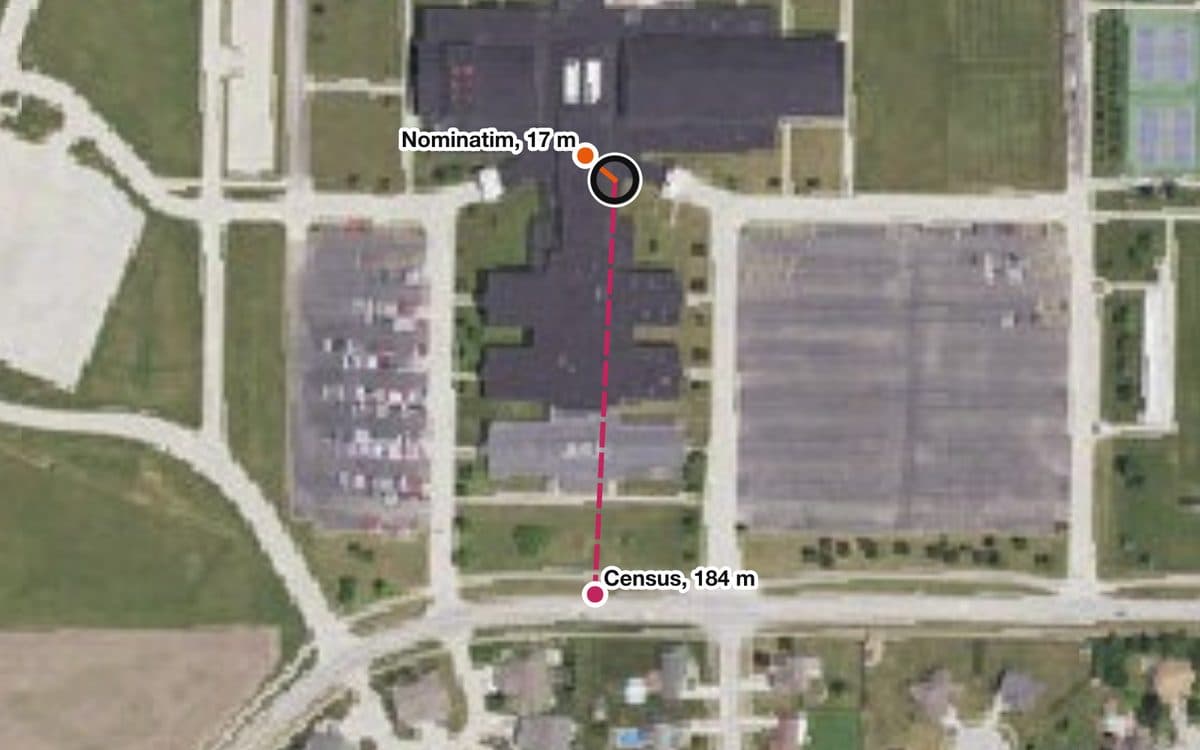
It is less precise than it looks. The Census places each point by interpolating along the street's address range, not on the building. The median error was 128 m, and only 29 of the 87 points fell within 100 m of the school. On a large school lot, the point lands on the street in front.
Use it when: your addresses are in the US and you need many of them fast.
Method 4: BAN and the Géoplateforme for French addresses
In France, the Base Adresse Nationale (BAN) is the official address base. Its geocoding service now runs on the IGN Géoplateforme at https://data.geopf.fr/geocodage/ and needs no key.
- One address at a time: the French Locator Filter plugin, maintained by Oslandia, adds it to the QGIS search bar.
- A whole file: send your CSV to the
/geocodage/search/csvendpoint. Files must be UTF-8 and under 50 MB or 200,000 lines, and the service allows 50 requests per second per IP.
It placed all 100 French schools in 0.46 seconds. The median error was 8 m and 94 of the 100 landed on a house number, not just a street.
Read the result_score column. Our one disaster, a school sent 200 km away to Clamart, had a score of 0.54 because its postcode was a CEDEX code (a business mail code) that matches no town. It was the only score under 0.6. Filter low scores and check them by hand.
Use it when: your addresses are in France. Nothing else we tested came close.
Method 5: Ask AI Agent in one sentence
AI Agent is our QGIS plugin that runs a task you type, in the project you have open. It reads your layers and fields, picks the tools and shows what it changed.
We loaded the 100 US addresses, without coordinates, and typed:
Geocode the addresses in us_schools and save the points as a GeoPackage. Tell me how many addresses were not found.
It saw that street, city, state and ZIP sat in separate fields and built a full address in a working copy, so the original table stayed untouched. Then it geocoded, saved the GeoPackage and kept the misses in their own table. The answer came in about a minute: 93 points found, 7 not found.
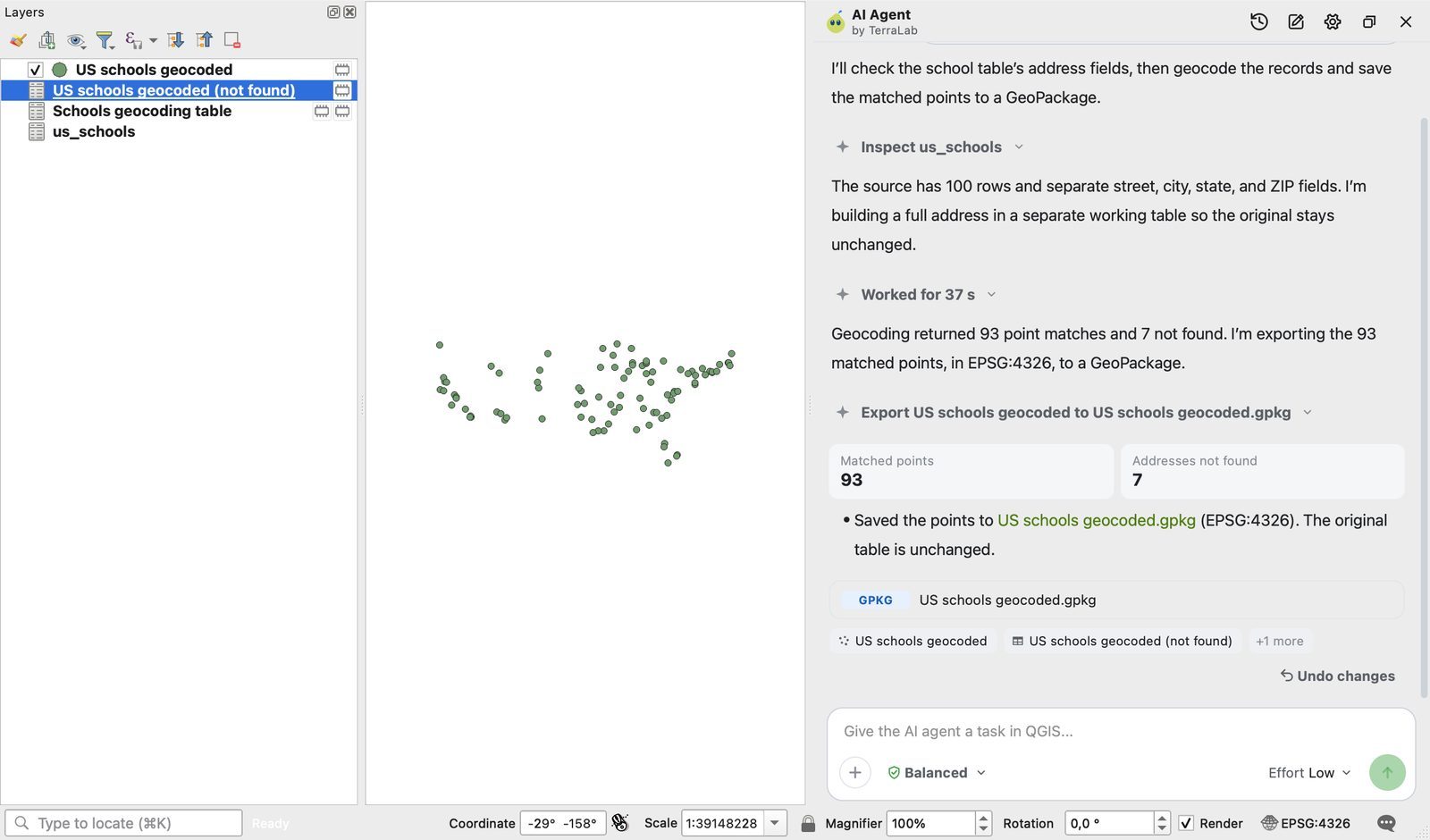
93 is the best match rate of our US test, not the best accuracy. Where Nominatim and the Census return nothing, its geocoder returns a best guess. 17 points landed more than 1 km away, often on a place with a similar address: a hospital, a fire station, a church. The median error was 184 m.
So we asked it to flag the points that looked wrong. In 3 minutes it compared each point's ZIP code with the source, flagged 6 in red, and said this was a label check, not a boundary check. 3 of the 6 were indeed more than 1 km off. That left 14 far points unflagged, so for a US list, compare with a second geocoder as shown below.
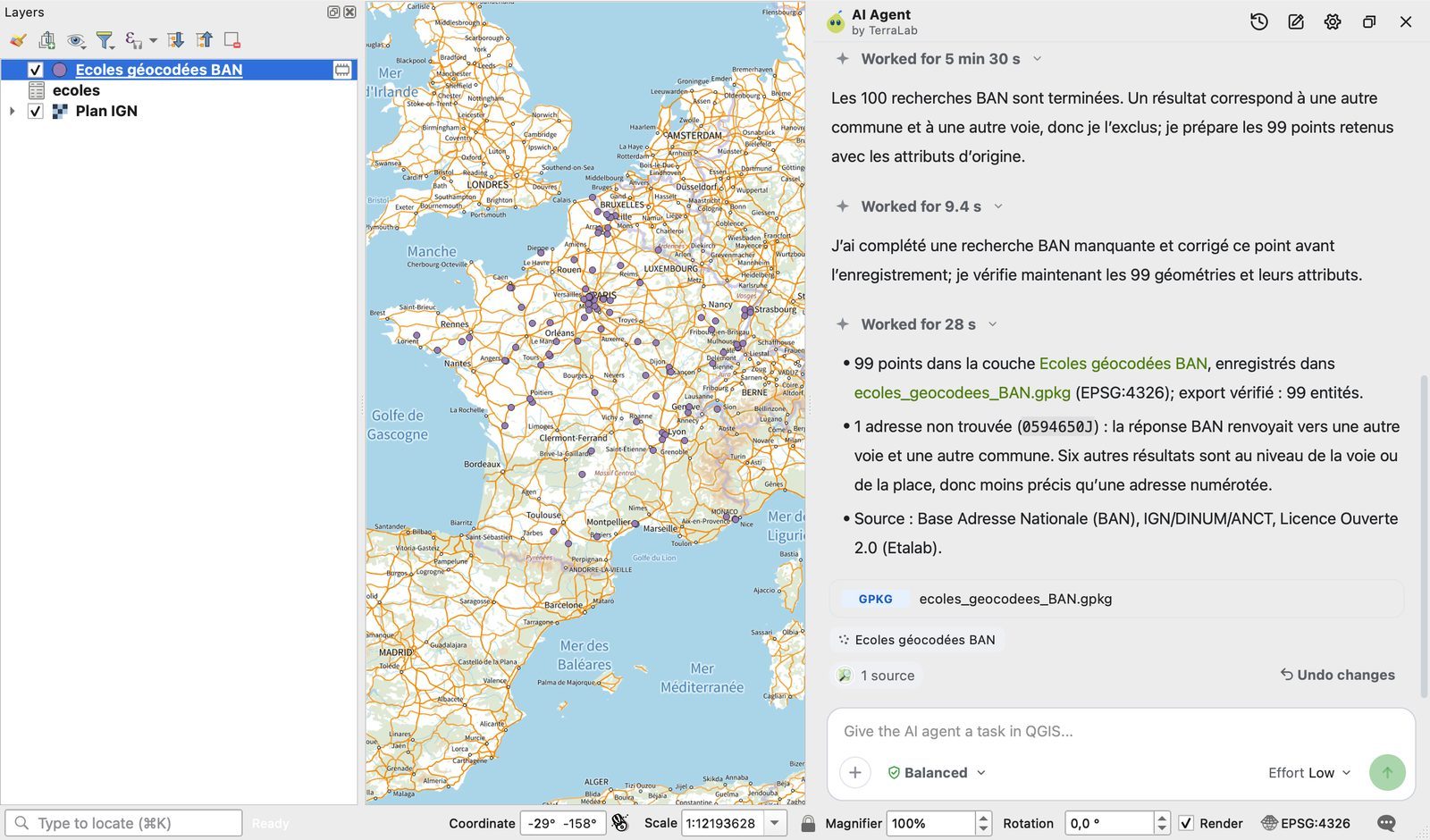
French addresses tell a different story. Asked in French to geocode the 100 schools "with the Base Adresse Nationale (BAN)", it first asked whether to query the BAN address by address or use its faster batch geocoder. We chose the BAN. About 8 minutes later it had placed 99 schools, with a median error of 7 m and no point more than 170 m off. It dropped one answer on its own, because the BAN pointed to another street in another town: the Watten address that put the plain BAN batch 2.4 km off. It also avoided the 200 km CEDEX error.
Use it when: your addresses need cleaning or splitting first, or the geocoding is one step of a longer task. In France, name the BAN in your sentence.
Skip it when: you geocode the same file every week. Save a model once.
One address at a time: the locator bar
For a single address, you do not need a tool at all. Click the search bar at the bottom left of QGIS (Ctrl+K), type > then a space and the address. QGIS asks Nominatim and zooms to the result. It does not search as you type, by design, to respect the Nominatim policy.
For French addresses, the French Locator Filter plugin does the same against the BAN.
How accurate is free geocoding?
"Found" is not "right". Here is how close the answers landed, out of 100 addresses each:
| Route | Within 50 m | Within 100 m | Over 1 km |
|---|---|---|---|
| BAN, France | 82 | 94 | 2 |
| AI Agent with the BAN, France | 83 | 95 | 0 |
| Nominatim, France | 50 | 65 | 2 |
| Batch Nominatim geocoder, US | 27 | 42 | 4 |
| AI Agent, US | 28 | 44 | 17 |
| US Census | 6 | 29 | 2 |
A missing address counts as neither close nor far.
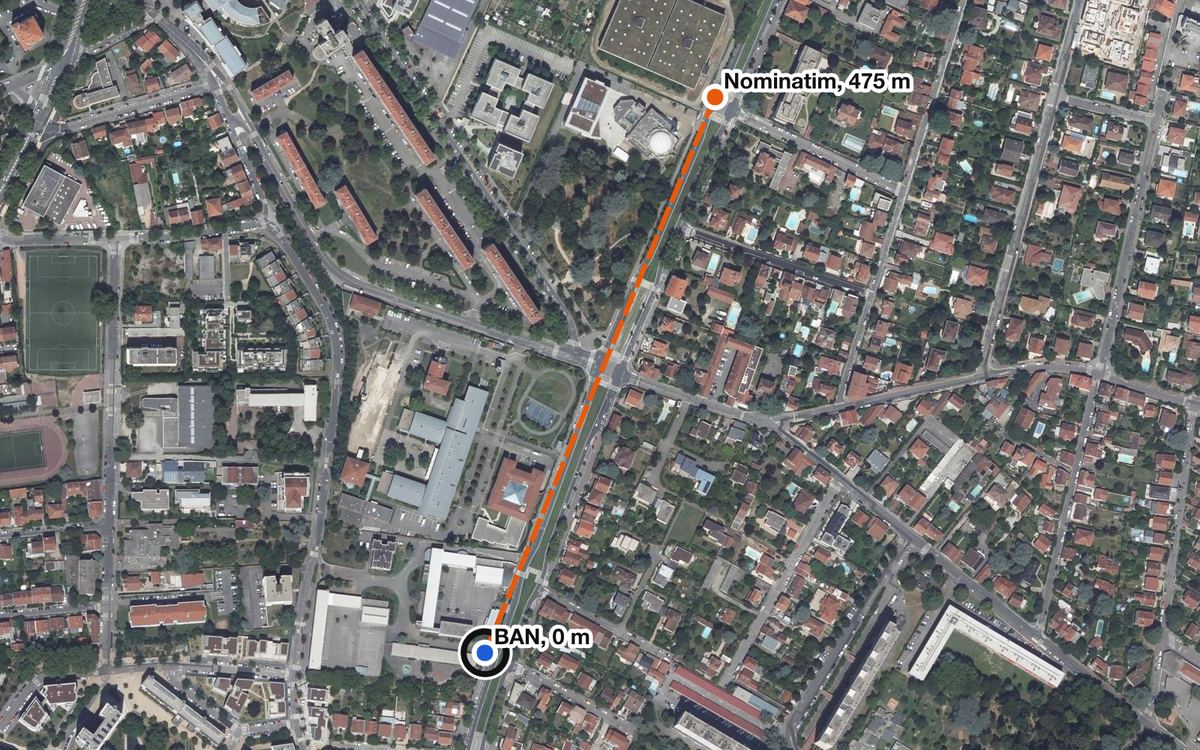
The misses follow a few patterns:
- Street-level fallbacks. When Nominatim does not know the house number, it returns a point on the street. That happened for 34 of the 100 French addresses. On a long road, that point can be far from the door.
- Interpolation. The US Census assumes numbers are evenly spaced along a block. Schools sit on large lots, so the point lands on the street, in front of the wrong part of the lot.
- The same address in the wrong town. Nominatim placed "51 rue Jean Jaurès, Angers" in Trélazé, a neighbouring town, 2.9 km away. Always keep the town in the address.
- Odd formats. Nominatim returned nothing for 8 French addresses. Several carried a double space, "DR" for "Docteur", a "3 bis" number or a hamlet name in the street line. BAN read all of them.
- The address is wrong, not the geocoder. Census and Nominatim agreed within 51 m on a school in Mesa, Arizona, while the official point sits 10 km away. The address on file was simply not where the school is.
Two cheap checks catch most of these:
- Combine two services. In the US, Census first and Nominatim for its misses found 96 of 100 addresses.
- Compare them. Flag every row where two geocoders disagree by more than 500 m. That flagged 5 US rows and 4 French rows, and every one held a real error.
Reverse geocoding in QGIS
Reverse geocoding goes the other way: from a point to the nearest address. QGIS has no built-in batch tool for it, but you have three free routes:
- MMQGIS > Reverse Geocode sends each point to Nominatim (or Google with a key) and adds the address fields.
- The BAN
/geocodage/reverse/csvendpoint takes a CSV with latitude and longitude columns. Right-click your point layer, Export > Save Features As…, choose CSV and setGEOMETRYtoAS_XY. - AI Agent has a reverse geocoding tool too, so a sentence such as "add the nearest address to each point" works.
We sent the 100 official school points back through two services. The BAN answered in 0.59 seconds and gave the right town for 97 points, the right street for 88, and the exact number and street for 58. Nominatim took 111 seconds for the US points, and for 58 of them it returned the school itself, since schools are mapped in OpenStreetMap. Only 34 came back with the exact number and street.
The lesson: reverse geocoding returns the nearest address, not "the" address. A school on a corner gets the side street. Use it to label points, not to rebuild an address list.
What to remember
Use the Batch Nominatim geocoder for a few hundred addresses anywhere, and expect a median error near 100 m.
Use the US Census batch for US lists and the BAN for French lists. They are faster and, in France, far more precise.
Always check the misses, the low scores and the rows where two services disagree.
If the addresses need cleaning first, describe the result you want to AI Agent, name the geocoder you trust, and check what it built.
Questions people ask
How do I geocode addresses in QGIS?
Load your CSV as a table, build one full address field with the Field Calculator, then run Batch Nominatim geocoder from the Processing Toolbox. It is built into QGIS since version 3.20 and needs no key. MMQGIS does the same from separate columns.
Is geocoding in QGIS free?
Yes. Nominatim, the US Census geocoder and the French BAN are free and need no API key. Nominatim allows one request per second and discourages large bulk jobs. Google geocoding in MMQGIS needs a paid API key.
How accurate is Nominatim geocoding?
On our 100 US schools, the QGIS tool found 81 addresses with a median error of 95 m. On 100 French schools, Nominatim found 92 with a 46 m median. About a third of the French results fell back to the street because the house number was missing in OpenStreetMap.
How do I do reverse geocoding in QGIS?
Use MMQGIS > Reverse Geocode with Nominatim, or send a CSV of coordinates to the BAN /geocodage/reverse/csv endpoint for French points. Expect the nearest address, which is often the side street for buildings on a corner.
Can AI geocode addresses in QGIS?
Yes. AI Agent geocoded our 100 US addresses from one typed sentence in about a minute and found 93, though 17 landed more than 1 km away. Asked to use the BAN for 100 French addresses, it placed 99 with a 7 m median error in about 8 minutes.