IGN WMS and WMTS in QGIS: Geoplateforme URLs, Layers, Fixes
Published
To add an IGN layer in QGIS, open Layer > Add Layer > Add WMS/WMTS Layer…, click New, paste https://data.geopf.fr/wms-r/wms, then Connect. Pick ORTHOIMAGERY.ORTHOPHOTOS for the French orthophoto or GEOGRAPHICALGRIDSYSTEMS.PLANIGNV2 for Plan IGN, and click Add. No key, no account. The old wxs.ign.fr addresses are dead: if an IGN layer stays empty in an old project, check that first.
| What you want | URL to paste in QGIS | Layers on 19 October 2026 |
|---|---|---|
| Orthophoto, Plan IGN, cadastre as images, sharp in any CRS | https://data.geopf.fr/wms-r/wms (WMS raster) | 455 |
| The same as tiles, fastest in Web Mercator | https://data.geopf.fr/wmts (WMTS) | 728 |
| Vector data drawn as images | https://data.geopf.fr/wms-v/ows (WMS vector) | 487 |
| The features themselves: buildings, parcels, communes | https://data.geopf.fr/wfs/ows (WFS) | 862 feature types |
| Plan IGN as vector tiles | https://data.geopf.fr/tms/1.0.0/ (TMS) | 830 entries |
These are the URLs of the cartes.gouv.fr QGIS tutorial, updated on 27 May 2026. The layer counts come from the GetCapabilities we downloaded on 19 October 2026.
Add the IGN orthophoto over WMS
Open the WMS window
Layer > Add Layer > Add WMS/WMTS Layer…. You can also right-click WMS/WMTS in the Browser panel and choose New Connection.
Create the connection
Click New. Name it, for example "Geoplateforme WMS raster", and paste https://data.geopf.fr/wms-r/wms in the URL field. Leave authentication empty, then OK.
Connect and filter
Click Connect. The list has 956 rows, layers and styles mixed. Type "Photographies aériennes" or the exact name in the search box instead of scrolling.
Pick the layer and the CRS
Select ORTHOIMAGERY.ORTHOPHOTOS, keep JPEG encoding, and set the CRS at the bottom to your project's, here EPSG:2154 Lambert-93. Click Add.
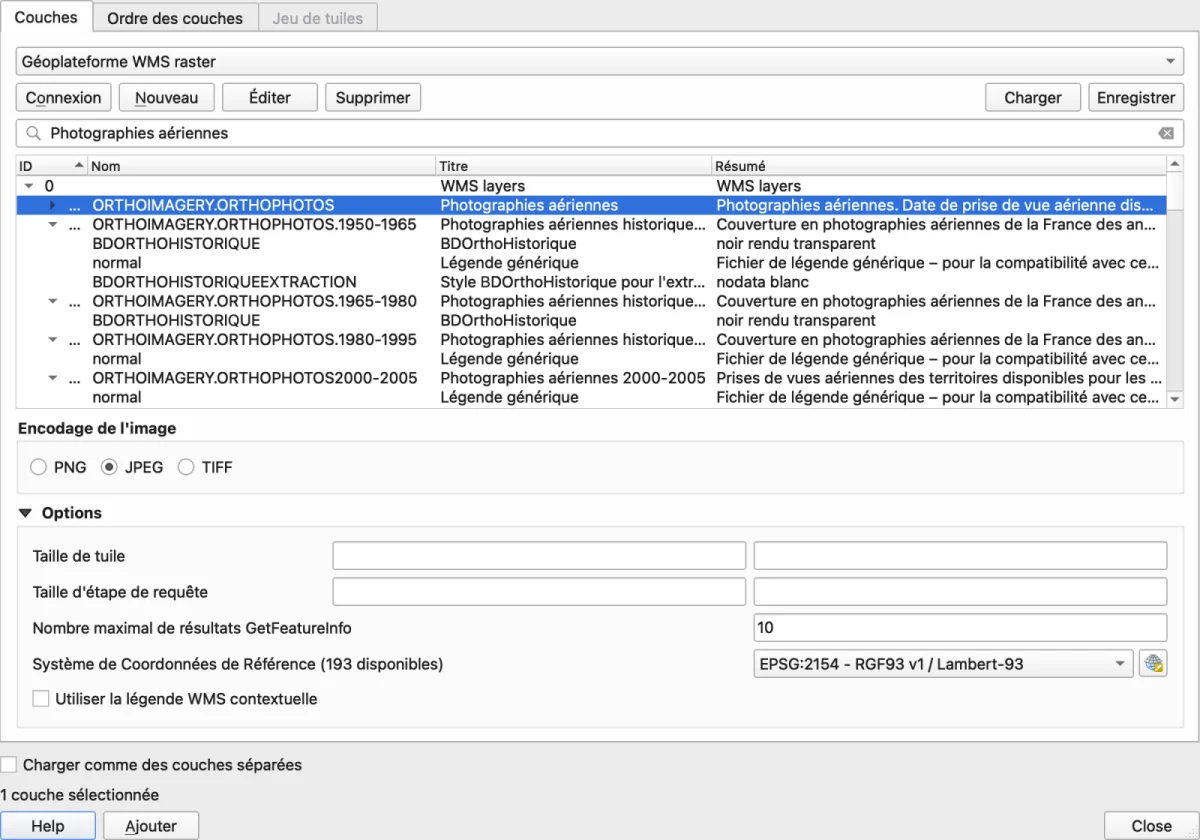
For WMTS, do the same with https://data.geopf.fr/wmts. The Tilesets tab then lists each layer with its tile grid, PM_0_19 for most, or a Lambert-93 grid for the .L93 variants.
The 10 IGN layers worth knowing
All these names are in the public GetCapabilities, so they are free and need no key.
| Layer | Exact name | Services |
|---|---|---|
| Aerial photos, the most recent everywhere | ORTHOIMAGERY.ORTHOPHOTOS | WMS raster, WMTS |
| BD ORTHO 20 cm | HR.ORTHOIMAGERY.ORTHOPHOTOS | WMS raster, WMTS (and .L93) |
| Plan IGN v2 | GEOGRAPHICALGRIDSYSTEMS.PLANIGNV2 | WMS raster, WMTS (and .L93) |
| Cadastre as an image | CADASTRALPARCELS.PARCELLAIRE_EXPRESS | WMS raster, WMTS (and .L93) |
| Cadastre as features (parcels, buildings, communes) | CADASTRALPARCELS.PARCELLAIRE_EXPRESS:parcelle | WFS, 9 types in all |
| Historical orthophotos | ORTHOIMAGERY.ORTHOPHOTOS.1950-1965, .1965-1980, .1980-1995 | WMS raster, WMTS |
| Colour infrared | ORTHOIMAGERY.ORTHOPHOTOS.IRC | WMS raster, WMTS |
| LiDAR HD terrain hillshade | IGNF_LIDAR-HD_MNT_ELEVATION.ELEVATIONGRIDCOVERAGE.SHADOW | WMS raster, WMTS |
| BD TOPO buildings | BDTOPO_V3:batiment | WFS, 115 BD TOPO types |
| Administrative boundaries | LIMITES_ADMINISTRATIVES_EXPRESS.LATEST | WMS raster, WMTS, WFS |
The WMS raster also serves the LiDAR HD terrain, surface and height models in Lambert-93, for example IGNF_LIDAR-HD_MNH_ELEVATION.ELEVATIONGRIDCOVERAGE.LAMB93. To download the tiles themselves, see our LiDAR HD guide.
Two gaps matter. The SCAN 25 and SCAN 100 maps are not in the public services. Restricted data goes through the /private/ addresses, which answer 401 without a key, created under "Mes clés d'accès" on cartes.gouv.fr. And THR.ORTHOIMAGERY.ORTHOPHOTOS, listed down to level 21, returned no tile at all over Angers.
WMS or WMTS: what we measured
WMS draws an image on request for the exact extent, scale and CRS of your map. WMTS sends pre-cut tiles on a fixed grid, almost always Web Mercator (EPSG:3857). We rendered both in QGIS over Nantes, Tours and Le Mans, 1,600 x 1,000 pixels, project in Lambert-93, cache cleared before each render.
| Median of 3 cities | 1:50,000 | 1:10,000 | 1:2,000 |
|---|---|---|---|
| Orthophoto, WMS | 1.18 s | 1.38 s | 2.44 s |
| Orthophoto, WMTS | 1.25 s | 0.85 s | 1.64 s |
| Orthophoto, XYZ | 1.34 s | 0.85 s | 1.88 s |
| Plan IGN v2, WMS | 1.61 s | 2.44 s | 1.90 s |
| Plan IGN v2, WMTS | 1.44 s | 1.11 s | 1.79 s |
Plan IGN v2, WMTS .L93 | 0.82 s | 0.68 s | 2.10 s |
Everything draws in under 2.5 seconds. WMTS wins a little at 1:10,000, but speed does not decide between them. Sharpness does.
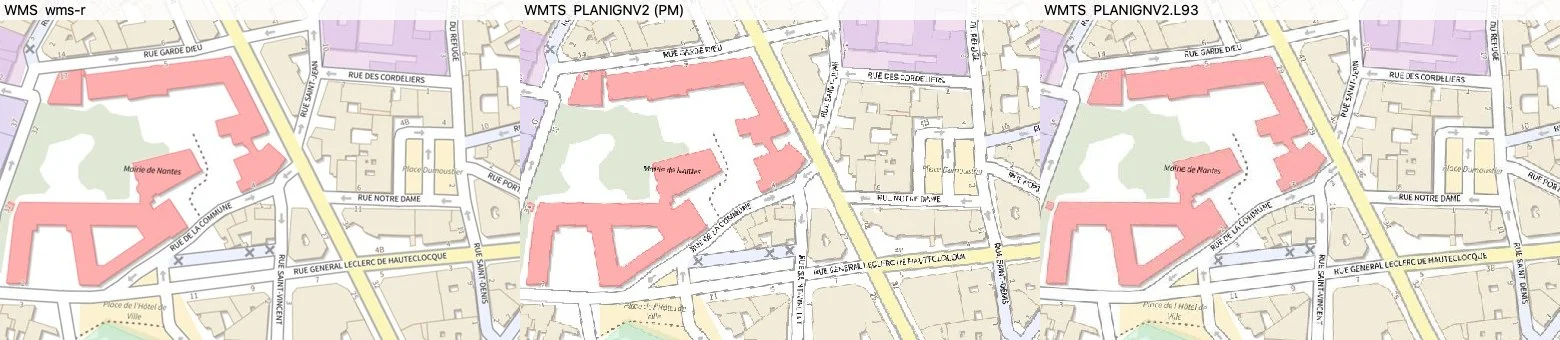
That is the "blurry Plan IGN" people report. In Lambert-93, QGIS has to warp every Web Mercator tile into the project's projection, with a rotation of about 2.6 degrees at Angers. A photo survives that. A map with thin text does not. The rule:
- Project in Lambert-93: use WMS, or the
.L93WMTS variant (GEOGRAPHICALGRIDSYSTEMS.PLANIGNV2.L93,HR.ORTHOIMAGERY.ORTHOPHOTOS.L93), served directly on an EPSG:2154 grid. - Project in Web Mercator: the standard WMTS is perfect and the fastest.
Maximum zoom matters too. The orthophoto over WMTS stops at level 19, 0.30 m pixels on paper, about 0.20 m on the ground at the latitude of Angers. Beyond that the server returns an error and QGIS enlarges the last tile. The Lambert-93 grid of the .L93 variants goes to level 20, at 0.20 m. WMS has no levels: it returns an image at any scale.
Why the IGN layer does not show
The URL starts with wxs.ign.fr. IGN shut its old infrastructure down for good on 15 March 2024 (IGN agenda). On 19 October 2026 the domain no longer even resolves. The keys such as essentiels or decouverte went with it. Use the URLs in the first table.
You added it as XYZ tiles and it stays blank. XYZ works if the URL is exact. A correct URL drew the orthophoto in 1.27 seconds over Angers. Four mistakes give an empty layer with no message:
- Wrong format. The orthophoto exists only as
image/jpeg, Plan IGN and the cadastre only asimage/png. Copying the Plan IGN URL and changing only the layer name returns a 400 "Format image/png unknown" on every tile. {-y}instead of{y}. Tile rows count from the top. With{-y}the server answers 404.- Maximum level too high. At level 20 the orthophoto answers 400. Set the maximum to 19.
- In PyQGIS, an unencoded URL. In a hand-written
type=xyz&url=...source, the&of the WMTS URL must be encoded as%26, or QGIS reads them as its own parameters. The New XYZ Connection window in the Browser encodes it for you.
The XYZ URL that works for the orthophoto:
https://data.geopf.fr/wmts?SERVICE=WMTS&REQUEST=GetTile&VERSION=1.0.0&LAYER=ORTHOIMAGERY.ORTHOPHOTOS&STYLE=normal&TILEMATRIXSET=PM&FORMAT=image/jpeg&TILEMATRIX={z}&TILEROW={y}&TILECOL={x}
Error 401 or "Unauthorized". You are calling a /private/ address, or a connection kept authentication from an earlier try. For the public services, Edit the connection and set authentication to none.
Error 429, or tiles missing now and then. The Geoplateforme caps requests per second per IP address: 40 for WMS raster, 50 for WMS vector, 30 for WFS. WMTS and vector tiles have no cap (usage limits, cartes.gouv.fr). An atlas printing dozens of pages over WMS can hit the cap: switch it to WMTS.
Behind a corporate proxy. If your browser opens https://data.geopf.fr/wmts?SERVICE=WMTS&REQUEST=GetCapabilities but QGIS does not, set the proxy under Settings > Options > Network.
Plan IGN text looks blurry. See the previous section: WMS or the .L93 variant in Lambert-93.
Features over WFS: cadastre and BD TOPO
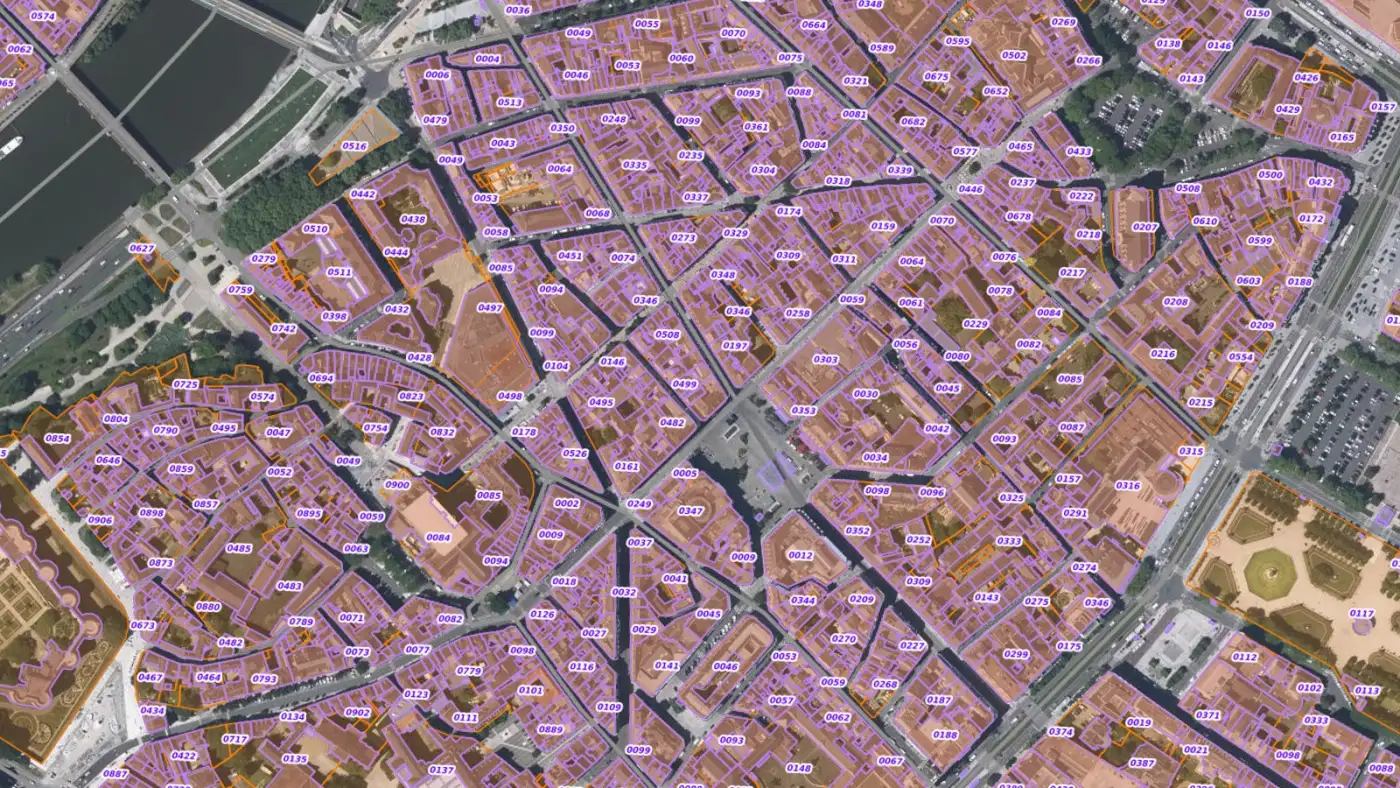
A WMS or WMTS layer is a picture: you cannot select a parcel or read its area. For that, use WFS.
Layer > Add Layer > Add WFS / OGC API - Features Layer…, New, URL https://data.geopf.fr/wfs/ows, Connect. Look for CADASTRALPARCELS.PARCELLAIRE_EXPRESS:parcelle for parcels or BDTOPO_V3:batiment for buildings. Zoom to your area first and tick Only request features overlapping the view extent, so WFS loads only what you see. Our spatial join guide loads 103,910 BD TOPO buildings over Lyon this way.
For Plan IGN as vector tiles, sharp at every scale, right-click Vector Tiles in the Browser, New Generic Connection, with the URL https://data.geopf.fr/tms/1.0.0/PLAN.IGN/{z}/{x}/{y}.pbf and the style https://data.geopf.fr/annexes/ressources/vectorTiles/styles/PLAN.IGN/standard.json. The server offers nine styles, including gris, epure and sans_toponymes.
Do it in one sentence with AI Agent
AI Agent is our QGIS plugin that carries out a written task in the open project. In an empty Lambert-93 project, we typed, in French:
Ajoute l'orthophoto IGN et le cadastre sur Angers
(Add the IGN orthophoto and the cadastre over Angers.) It searched its data catalogue for IGN sources, located Angers, added the orthophoto and the cadastre from the Geoplateforme, then checked the render. The panel showed 1 min 19 s in total. It chose XYZ tiles with the right formats, JPEG for the orthophoto and PNG for the cadastre. Adding the tiles had switched the project to Web Mercator. The agent noticed, set the original Lambert-93 back, and framed the city centre at 1:24,692.
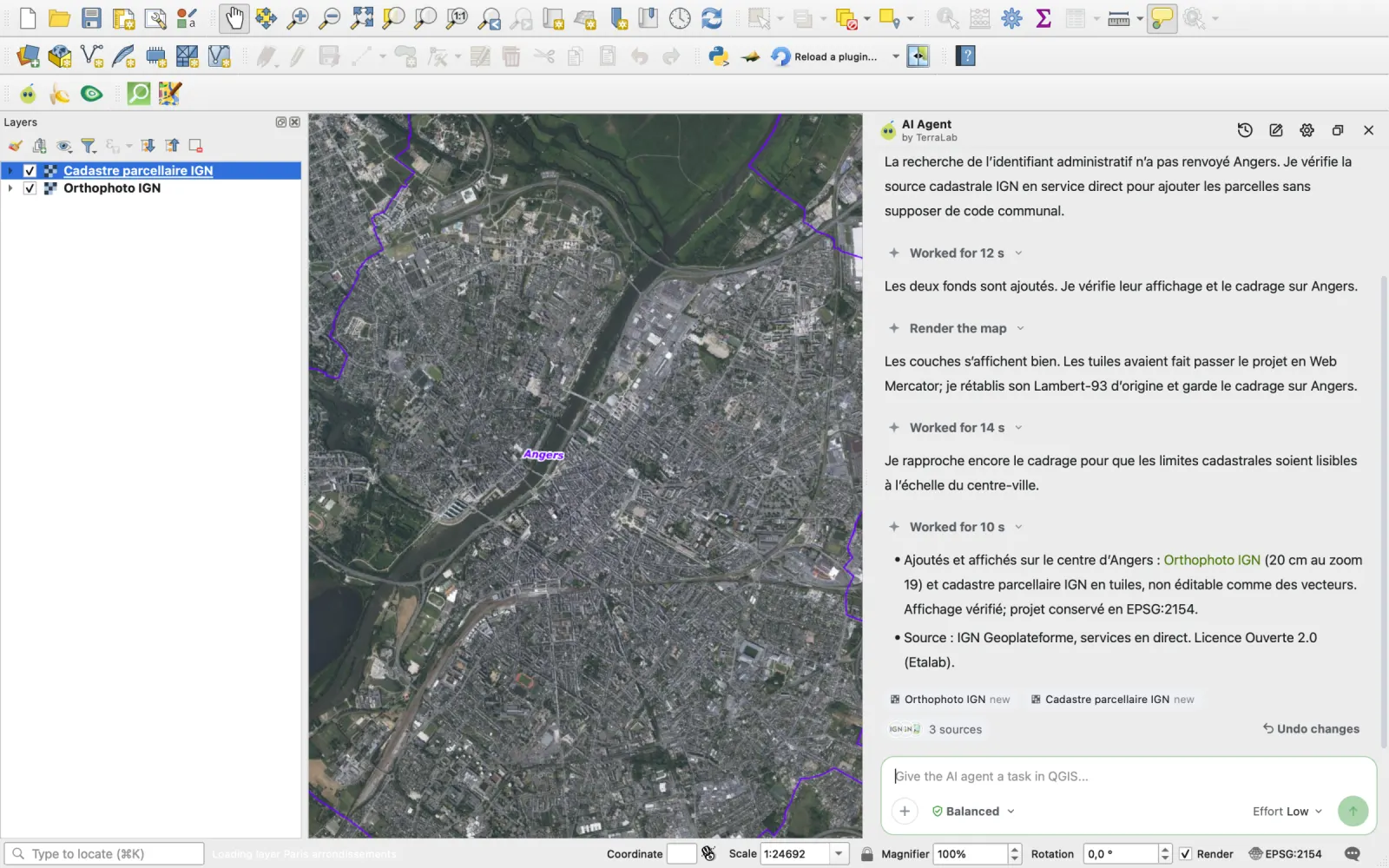
At that scale the cadastre shows commune boundaries. Zoom in to see the parcels. If you want the parcels as features, ask for it: the agent's answer points that out itself.
What to remember
Paste https://data.geopf.fr/wms-r/wms for the orthophoto and Plan IGN. No key.
In Lambert-93, prefer WMS or the .L93 variants. In Web Mercator, the standard WMTS.
A blank IGN layer almost always comes from a wxs.ign.fr URL, a wrong format or a {-y}.
To select parcels or buildings, use WFS. For basemaps from other countries, see how to add a basemap in QGIS, and for coordinate systems, what a CRS is.
Questions people ask
Are IGN web services free in QGIS?
Yes. Since 1 January 2021, IGN's public data is free under the Licence Ouverte Etalab 2.0. The Geoplateforme services work with no key and no account. Only restricted data, served from the /private/ addresses, needs a key.
What is the IGN WMS URL?
https://data.geopf.fr/wms-r/wms for images (orthophoto, Plan IGN, cadastre), https://data.geopf.fr/wmts for tiles, https://data.geopf.fr/wfs/ows for features. The old wxs.ign.fr addresses no longer work.
Why does my IGN layer no longer show in QGIS?
Most often the project still uses a wxs.ign.fr address, shut down in March 2024. Replace it with a data.geopf.fr one. If the layer was added as XYZ, check the format (JPEG for the orthophoto, PNG for Plan IGN), {y} rather than {-y}, and a maximum level of 19.
WMS or WMTS for the French orthophoto?
In our tests both draw in under 2.5 seconds. WMTS is slightly faster and has no request cap. WMS stays sharp in any project CRS. In Lambert-93, use WMS or the HR.ORTHOIMAGERY.ORTHOPHOTOS.L93 layer.
How do I get the French cadastre in QGIS?
As an image, add CADASTRALPARCELS.PARCELLAIRE_EXPRESS from the WMS raster or the WMTS. As selectable features, add CADASTRALPARCELS.PARCELLAIRE_EXPRESS:parcelle from the WFS at https://data.geopf.fr/wfs/ows, after zooming to your commune.