ArcGIS Pro on a Mac: 4 Ways and What They Cost
Published
There is no ArcGIS Pro for Mac. ArcGIS Pro 3.7 runs on Windows 11 and Windows Server only, so a Mac needs Windows first: in Parallels Desktop on Apple Silicon, with Boot Camp on an older Intel Mac, or on a cloud Windows desktop. ArcGIS Online works in Safari, and QGIS runs natively on macOS.
 runs natively on macOS.
I wrote this for the student or consultant with a MacBook who has to decide this week. The prices are US list prices read on 22 October 2026, before tax. The QGIS timings come from my own MacBook Air M4.
The options at a glance
| Option | First year, commercial | First year, student | What does not work |
|---|---|---|---|
| 1. Parallels on Apple Silicon | $1,000 | $350 | Deep learning not tested or certified by Esri, DirectX 12, tools that need AVX |
| 2. Boot Camp on an Intel Mac | $900 | $300 | M-series Macs, using macOS at the same time, and Apple's guide covers Windows 10 only |
| 3. Cloud GPU desktop | $4,420 | $3,820 | Offline work, and it is bought through a Microsoft 365 admin account |
| 4. ArcGIS Online in Safari | $700 | $100 | ArcGIS Pro projects and the desktop toolboxes |
| Alternative: QGIS | $0 | $0 | Esri extensions and ArcGIS Pro's own tools |
Commercial means an ArcGIS Creator licence at $700 a year, which includes ArcGIS Pro Basic. Student means ArcGIS for Student Use at $100 a year, which includes ArcGIS Pro Advanced, for academic projects only. Esri also sells ArcGIS for Personal Use at $100 a year, with ArcGIS Pro Basic, for noncommercial use.
What each option costs over three years
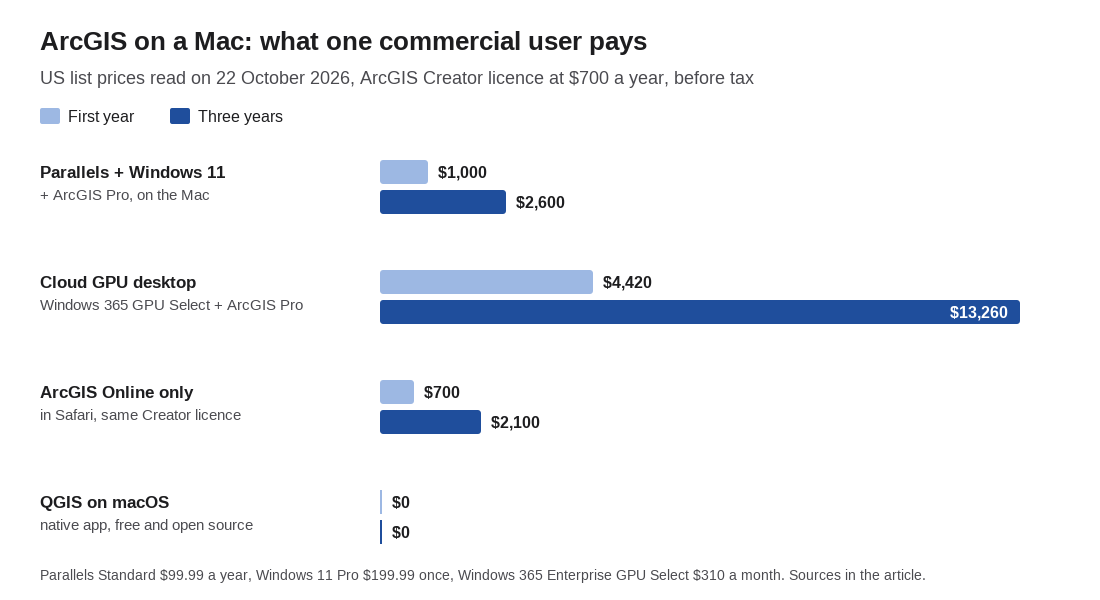
Here is how the bars add up, all in US dollars:
| Item | Price | 1 year | 3 years |
|---|---|---|---|
| ArcGIS Creator (includes ArcGIS Pro Basic and ArcGIS Online) | $700 a year | $700 | $2,100 |
| Parallels Desktop Standard | $99.99 a year | $100 | $300 |
| Windows 11 Pro, one licence per virtual machine | $199.99 once | $200 | $200 |
| Parallels route | $1,000 | $2,600 | |
| Windows 365 Enterprise GPU Select | $310 a month | $3,720 | $11,160 |
| Cloud GPU route, with Creator | $4,420 | $13,260 |
For a student, Parallels takes 50% off for students and educators ($49.99 a year for Standard), and Student Use replaces Creator. The Parallels route then costs $350 the first year and $650 over three years. Parallels showed first-year sale prices on the day I checked, so your first year may cost less. Check the store before you budget.
What works in each
Most of this comes from Esri's own page on running ArcGIS Pro on a Mac. The cells for QGIS are the plain facts of the app.
| Parallels, M-series Mac | Boot Camp, Intel Mac | Cloud GPU desktop | ArcGIS Online | QGIS on macOS | |
|---|---|---|---|---|---|
| ArcGIS Pro | Yes, in Windows 11 on Arm | Yes, Windows on the Mac's hardware | Yes, on x64 Windows | No, web apps only | No, its own tools |
| Deep learning tools | "Not tested or certified" | Needs an NVIDIA GPU with CUDA | With an NVIDIA GPU of 6 GB or more | In Map Viewer, with Professional or higher and Imagery Analysis | Through plugins |
| Graphics | DirectX 11 only, OpenGL falls back to the CPU | The Mac's own GPU | GPU required for virtual desktops | The browser | Native |
| Tools that need AVX | Do not work | Not listed as a limit | Not listed as a limit | Not applicable | Not applicable |
| ArcPy | Ships with ArcGIS Pro | Ships with ArcGIS Pro | Ships with ArcGIS Pro | In Notebooks, Advanced runtime | PyQGIS instead |
| Works offline | Yes | Yes | No | No | Yes |
One line on Esri's Mac page applies to every Mac user: Esri troubleshoots defects only on certified Windows x64 systems. A bug that shows up only in your virtual machine is yours to work around.
1. Parallels Desktop on an Apple Silicon Mac
Esri's page says ArcGIS Pro runs on an M-series Mac only in a virtual environment, such as Parallels Desktop. You need Parallels Desktop 18 or later, Windows 11 ARM as the guest and Microsoft's .NET Desktop Runtime 10. Esri recommends macOS Ventura or later. Microsoft lists Parallels Desktop 18, 19 and 20 as authorized for Windows 11 on Arm, and asks for one Windows licence per virtual machine.
Esri lists what to expect inside the virtual machine:
- Deep learning: "Deep learning tools are not tested or certified in this environment."
- Graphics: the GPU is virtualized as a display, so some tools can't detect it, including Esri's requirements checker. Only DirectX 11 is supported, and OpenGL gives a "no compatible graphics adapter" error and falls back to CPU emulation.
- AVX: tools that need the AVX instruction set don't work on Windows 11 ARM.
- Add-ins: to build ArcGIS Pro add-ins in the virtual machine, only Visual Studio 2022 version 17.4 or later is supported.
Memory is the limit people discover late. Esri asks for 8 GB at least and recommends 32 GB. Parallels Standard caps each virtual machine at 8 GB of memory and 4 CPUs, while Pro, at $119.99 a year, allows 128 GB and 32 CPUs.
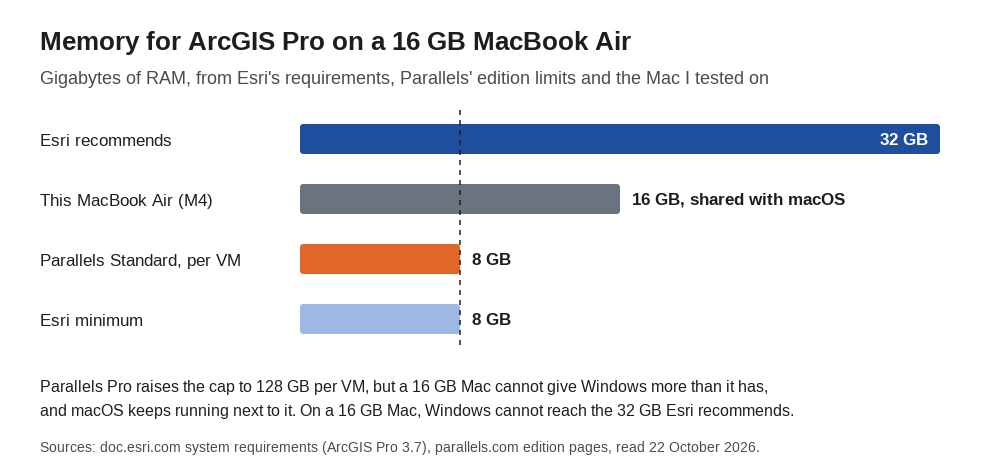
So on a 16 GB Mac, Parallels Pro buys little memory over Standard. On a 32 GB or larger Mac, Pro is the edition that lets Windows use it.
Use it when: your course or your client runs on ArcGIS Pro and you have an M-series Mac.
Skip it when: your work leans on the deep learning tools.
2. Boot Camp on an Intel Mac
Boot Camp installs Windows on its own partition, so Windows runs on the Mac's hardware. You restart to switch and can't use macOS at the same time. It exists on Intel Macs only, and Esri notes that macOS Tahoe 26 is the last version to support Intel processors.
Check one gap first. Apple's Boot Camp guide describes installing Windows 10, and ArcGIS Pro 3.7 lists Windows 11 and Windows Server only. On the same Intel Mac, Esri also documents Parallels Desktop 15 or later with Windows x64, which keeps macOS open next to Windows.
Use it when: you have an Intel Mac and want Windows on the full hardware.
Skip it when: your Mac has an M-series chip. Boot Camp does not exist there.
3. A cloud Windows desktop
Esri's 3.7 requirements say ArcGIS Pro "can run in many on-premises and cloud virtual desktop environments, and requires GPU acceleration". The list names Amazon EC2 GPU instances, Amazon WorkSpaces, Google Cloud GPU machines, Azure GPU virtual machines and Windows 365 Cloud PCs with GPU options. The desktop runs x64 Windows, the platform Esri certifies, so the Arm limits of option 1 do not apply.
Windows 365 is the one with a public price per user. Microsoft lists its Enterprise GPU Cloud PCs at $310 a month for GPU Select, meant for apps that need 4 GB of video memory or less, and $537 for GPU Standard, up to 8 GB. Esri asks for 6 GB of dedicated graphics memory as a minimum for deep learning, so the cheaper tier sits under that line. The Windows 365 Business plans, from $36 a month, list no GPU. Windows 365 is bought through a Microsoft 365 admin account, so in practice your organisation's IT sets it up.
Use it when: your organisation already uses Azure or AWS, or you need the deep learning tools Esri does not certify in a Mac virtual machine.
Skip it when: you often work offline, or you pay for it yourself.
4. ArcGIS Online in Safari
ArcGIS Online supports Safari 18 and later, as well as Chrome, Edge and Firefox. In Map Viewer you create and share web maps, edit hosted layers and run analysis. Feature analysis needs a Creator user type or higher, and raster analysis needs Professional or Professional Plus with the Imagery Analysis privilege. ArcPy runs in ArcGIS Notebooks with the Advanced runtime.
The cost surprise is that it saves nothing on the licence. Creator, at $700 a year, includes both ArcGIS Online and ArcGIS Pro Basic. Browser-only means you skip Parallels and Windows, about $300 the first year, and keep the same licence bill.
What it cannot replace is ArcGIS Pro itself. You work on web maps and hosted layers, not on a .aprx project.
Use it when: your job is web maps, field data or dashboards.
Skip it when: you need a geoprocessing tool only ArcGIS Pro has.
5. The alternative: QGIS on macOS, timed on a MacBook Air M4
QGIS publishes signed installers for macOS, for Intel and Apple Silicon Macs. The latest release is 4.2.3, from 25 September 2026, and 3.44.15 is the long-term release. It is free and open source.
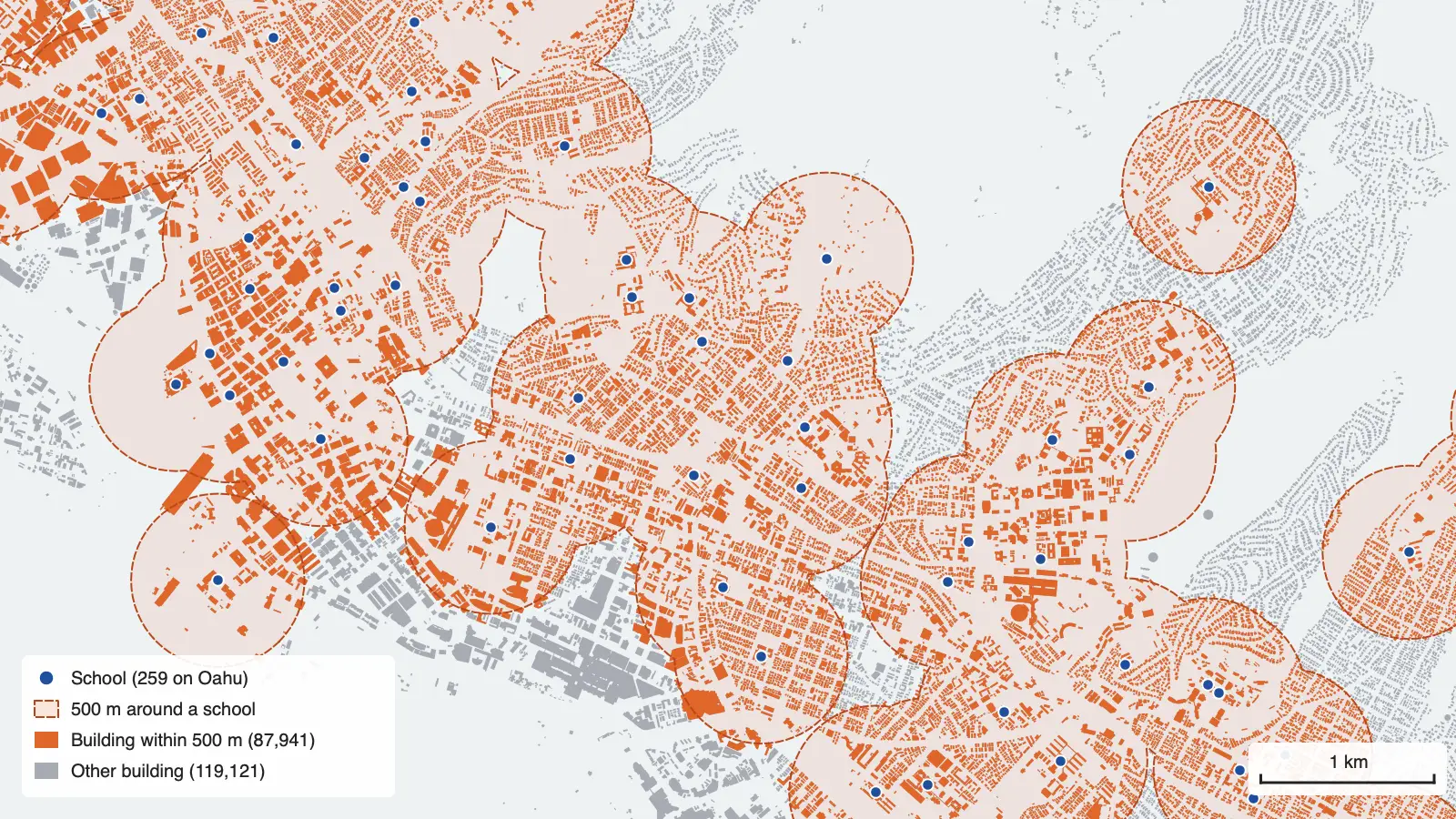
To see what that means on a student's laptop, I ran a typical lab exercise on my MacBook Air: which buildings on Oahu, Hawaii, stand within 500 m of a school. The data is a USGS file geodatabase, the same Esri format many ArcGIS courses hand out, and QGIS opened it directly.
| Step, in QGIS 3.44.8 | Run 1 | Run 2 |
|---|---|---|
| Start QGIS and its Processing tools | 1.6 s | 1.8 s |
| Open the geodatabase (374,703 buildings in Hawaii) | 0.04 s | 0.04 s |
| Keep Oahu's 207,062 buildings | 20.8 s | 11.8 s |
| Reproject them to UTM zone 4N, in metres | 16.4 s | 11.0 s |
| Select the 259 schools | 0.07 s | 0.03 s |
| Buffer them by 500 m and dissolve | 0.18 s | 0.08 s |
| Keep the buildings that touch a buffer | 13.3 s | 9.0 s |
| Whole job | 52.4 s | 33.8 s |
The answer: 87,941 buildings, 42.5% of Oahu's 207,062, stand within 500 m of a school. Drawing the 1600 by 900 pixel map at the top of this page took 0.37 seconds.
How I measured this
On 22 October 2026, on a MacBook Air M4 (10 cores, 16 GB, macOS 27.0.1), I ran QGIS 3.44.8 headless from a Python script and timed each Processing step. The QGIS app is a universal build, and the script ran as native arm64, with no translation layer. The data is the USGS National Structures Dataset for Hawaii, published as a file geodatabase with no use constraints. I ran the job twice and give both runs rather than the faster one. I did not time ArcGIS Pro in a virtual machine, because I have no ArcGIS licence on this Mac, so this is not a speed race between the two.
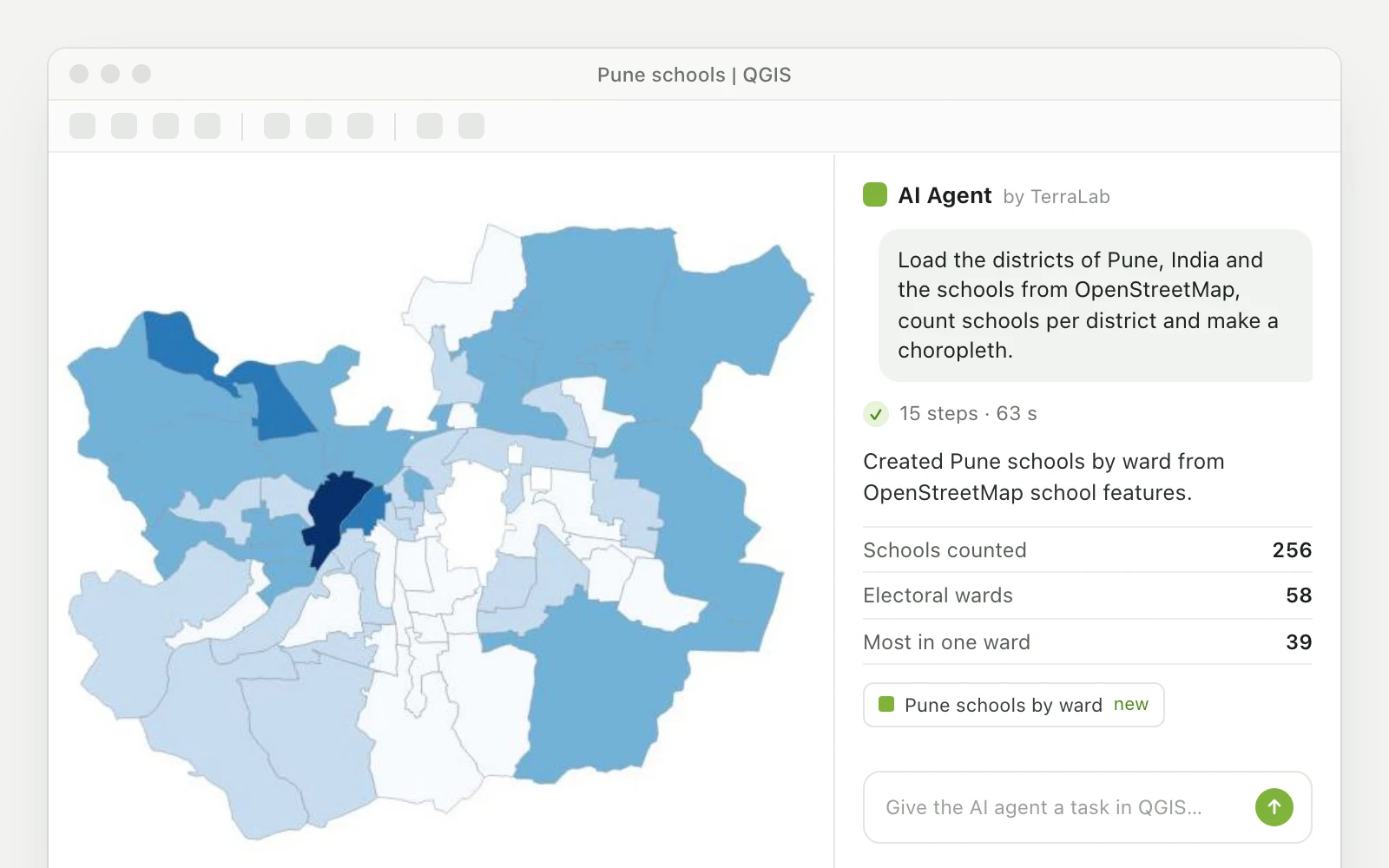
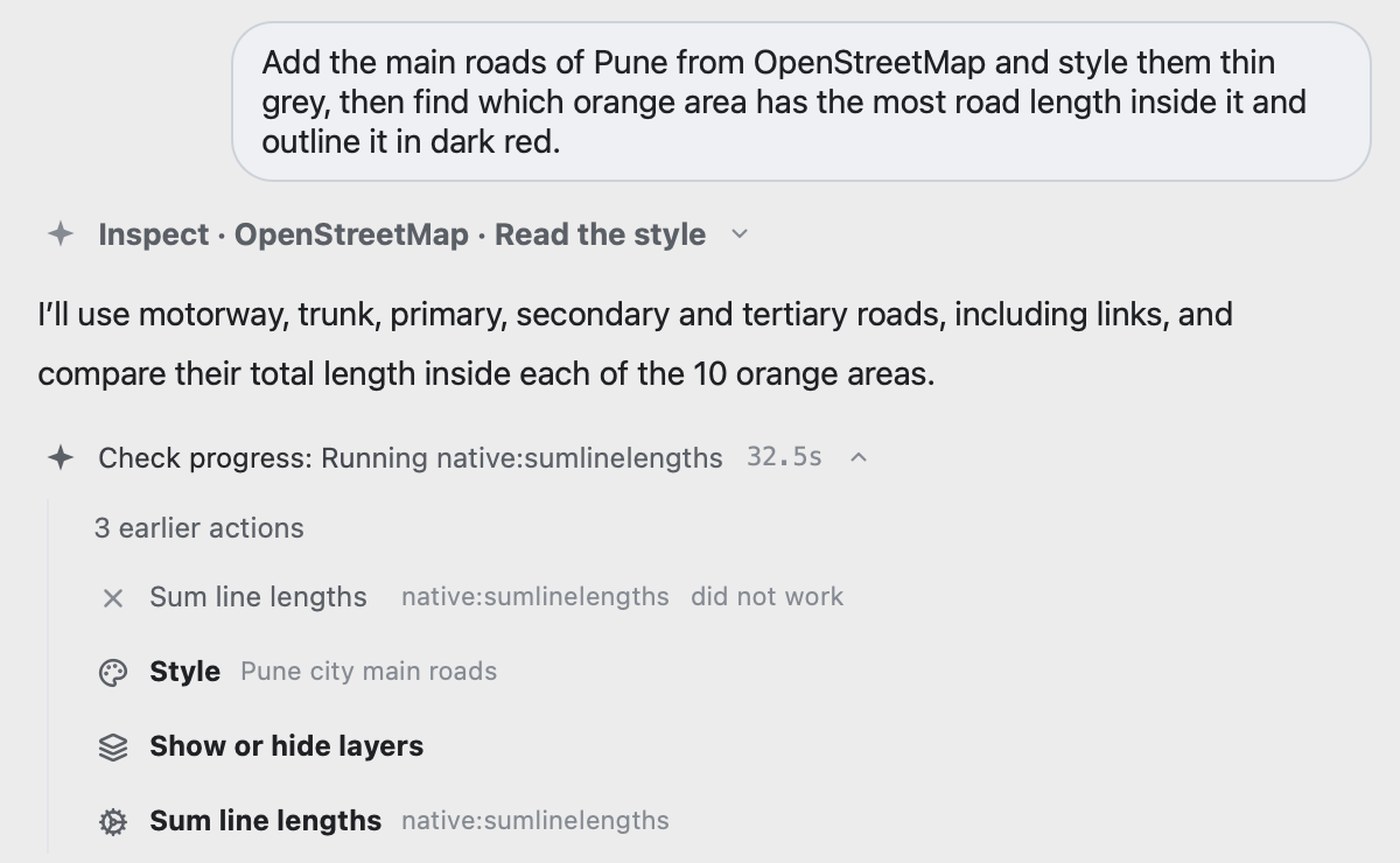
The hard part for an ArcGIS user is finding where each tool lives. We make AI Agent, a QGIS plugin, so this paragraph is about our own tool. It runs on macOS, Windows and Linux. You ask for a task in plain words, such as the school buffer above, and it runs the steps in your open project, shows each one, asks before deleting or overwriting anything, and one click undoes the message. The model is included, with no API key. There is a free plan, and Pro costs €39 a month.
Which one to pick
- A student with an M-series MacBook and a course on ArcGIS Pro: Student Use plus Parallels Standard, $350 the first year. Do the rest of your work in QGIS.
- A consultant whose clients send ArcGIS projects: Parallels on a Mac with 32 GB or more, $1,000 the first year. I would not move a whole practice to suit one laptop.
- Deep learning or heavy 3D: a cloud desktop with a GPU of 6 GB or more, or a Windows PC with an NVIDIA card.
- An Intel Mac: Parallels keeps macOS open, Boot Camp gives Windows the whole machine.
- Web maps only: ArcGIS Online in Safari, the same licence without the Windows layer.
- No Esri licence required: QGIS, natively.
Questions people ask
Can I run ArcGIS Pro on an M4 MacBook?
Yes, inside Parallels Desktop 18 or later with Windows 11 on Arm. Esri's Mac page covers "M-series" processors without naming models, so an M4 follows the same rules: deep learning not tested or certified, DirectX 11 only, no AVX tools. On a 16 GB M4, Windows can't get the 32 GB Esri recommends.
Is there ArcGIS Pro for Mac?
No. ArcGIS Pro 3.7 supports Windows 11 and Windows Server only. On a Mac, Esri describes a Windows virtual machine or Boot Camp, and its system requirements add cloud desktops.
How much does it cost to run ArcGIS Pro on a Mac?
With list prices on 22 October 2026, about $1,000 the first year for a commercial user: ArcGIS Creator $700, Parallels Standard $99.99 and Windows 11 Pro $199.99. For a student with Student Use and the Parallels student price, about $350. A GPU cloud desktop with Windows 365 starts at $310 a month on top of the licence.
Does ArcGIS Pro run on Parallels?
Yes, Esri documents it: Parallels 15 or later with Windows x64 on Intel Macs, 18 or later with Windows 11 ARM on M-series Macs. Esri troubleshoots defects only on certified Windows x64 systems.
What is the best GIS software for Mac?
For a native Mac app, QGIS: free, with signed installers for Intel and Apple Silicon. On my MacBook Air M4 it ran a 207,062-building analysis in 34 to 52 seconds. If your work has to stay in ArcGIS, use ArcGIS Online in Safari and ArcGIS Pro in Parallels or on a cloud desktop.
QGIS vs ArcGIS Pro compares the two on cost and everyday tasks, What is QGIS covers a first install, and spatial joins in QGIS goes deeper into the kind of step I timed above.
Do it in QGIS by asking for it
AI Agent carries out the task you describe, in your own QGIS project. Free, no card.