ArcGIS AI Assistant vs QGIS AI Agents in 2026
Published
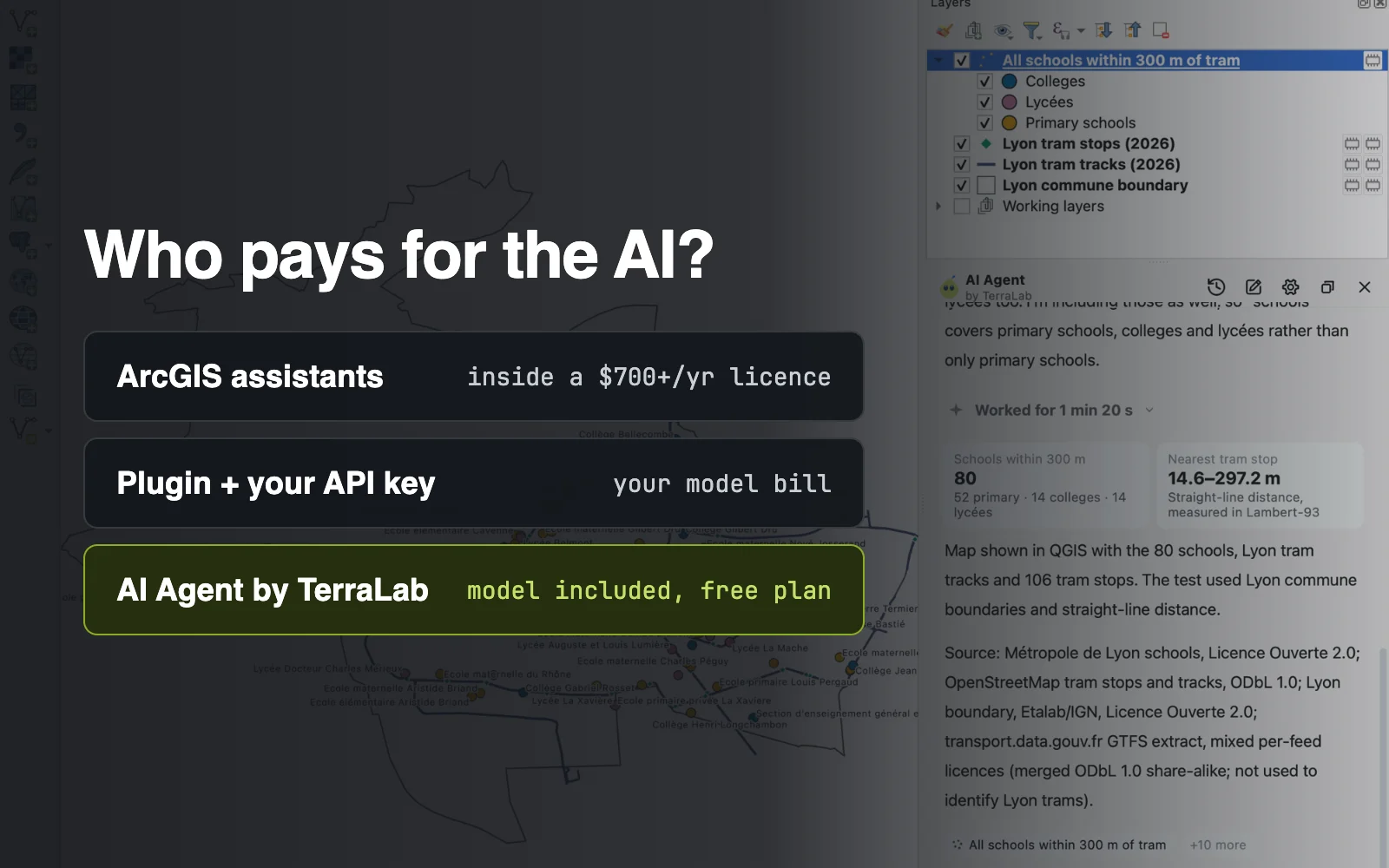
The ArcGIS AI assistants are free only if you already pay for ArcGIS: Esri includes them in its user types, which start at $700 a user a year for ArcGIS Pro. They live in ArcGIS Online, and the ArcGIS Pro assistant was still in beta on 28 October 2026. In QGIS, which is free, you have two routes: a free plugin that runs on your own AI key, or AI Agent, which we build, with the model included and a free plan.
 , which is free, you have two routes: a free plugin that runs on your own AI key, or
 Quick picks
- Whole QGIS tasks without an API key: AI Agent, model included, 5 free tasks a month.
- Your organization already pays for ArcGIS: Esri's assistants, included in your licence.
- You want to choose and pay the model yourself: AI Copilot, OpenGeoAgent or QGIS Agent.
- Nothing may leave your computer: one of those plugins with a local model through Ollama.
Try AI Agent free in QGIS, no card needed
Compared at a glance
| ArcGIS AI assistants | QGIS plugins with your own key | AI Agent by TerraLab (ours) | |
|---|---|---|---|
| Made for | Teams already on ArcGIS | People who want to choose the model | A whole GIS task done in QGIS |
| Software price | Included in a paid ArcGIS user type | Free | Free plan, Pro €49 a month |
| Model bill | None, no credits used | You pay your provider, or run a local model | Included |
| Where it runs | ArcGIS Online; Pro assistant in ArcGIS Pro 3.7 (beta) | QGIS, often QGIS 4 only | QGIS 3.28 to 4, Windows, macOS, Linux |
| Multi-step tasks | Not yet as one request (Esri, Pro beta) | Depends on the plugin and the model | Yes, from one sentence |
| Setup | An ArcGIS Online named user | A plugin plus an API key or Ollama | A plugin and a sign-in |
How I compared them
I read Esri's own announcements, the plugin pages in the official QGIS repository and our own documentation on 28 October 2026, and I reused two tests I ran myself in October: a timed task in Lyon and a public benchmark. I build AI Agent, so weigh my pick with that in mind.
One case is simple: if your organization already pays for ArcGIS and your data sits in ArcGIS Online, use Esri's assistants. They cost you nothing extra and they know Esri's apps. This page is for everyone else.
1. The ArcGIS AI assistants
Esri has added chat helpers across its apps. Since 24 June 2026, three of them are generally available and included in ArcGIS user types at no extra cost: Survey123, Business Analyst and translation. Using them does not consume credits, though a workflow they suggest can.
The others were still in beta: the ArcGIS Pro assistant, Notebooks, Arcade, documentation, Solutions and Item Details. Except for Item Details, Esri says all of them run only in ArcGIS Online.
- Made for: an organization that already has ArcGIS Online and ArcGIS Pro licences.
- Not for: a QGIS user, a freelancer without a licence, or anyone off Windows, since ArcGIS Pro runs on Windows.
- Price: included in an ArcGIS user type. ArcGIS Pro itself costs $700 (Creator), $2,200 (Professional) or $4,200 (Professional Plus) per user a year, read on Esri's store on 22 October 2026.
- What the Pro assistant does: runs listed actions ("zoom to the earthquakes layer", "open the buffer tool"), answers documentation questions, and writes ArcPy, SQL and OpenCypher.
Where it wins
- No model bill and no credits for the chat itself.
- Built by the company that makes the software, inside the apps your team already uses.
Where it falls short
- Esri's own beta notes say complex, multi-step workflows "aren't yet supported as a single request".
- Nothing here works in QGIS. ArcGIS Pro 3.7, an ArcGIS Online named user and the Semantic Search install option are required for the Pro assistant.
2. QGIS plugins that use your own API key
Since September, several free QGIS plugins have appeared that connect a model you choose to your project. You paste an API key from OpenAI, Anthropic, Google or DeepSeek, or point them to a local model through Ollama.
- AI Copilot, by Aidos Nazhmiden: turns a request into PyQGIS code and runs it. Version 1.5.2, 22 October 2026, QGIS 3.28 to 4.
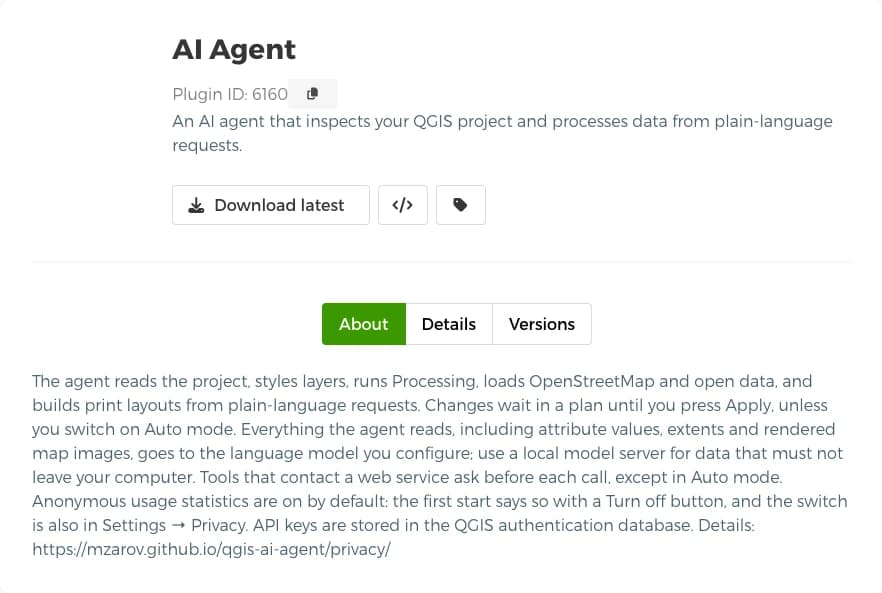
- AI Agent by mzarov: reads the project, runs Processing and builds layouts, with a plan to approve before changes. QGIS 4 only, about 2,080 downloads. Same name as ours, different plugin.
- OpenGeoAgent, by Qiusheng Wu: the most open about the model, with a ChatGPT sign-in or a local model.
- QGIS Agent, by bunkmr: a chat panel that can also act as an MCP server.
The plugin is free, the model is not. Each request is billed by your provider, unless you run a local model, which needs a capable machine.
- Made for: someone who wants to pick the model, read the code, or keep everything on a local model.
- Not for: someone who has no API key and does not want to manage one.
- Price: free plugin, plus your provider's usage bill.
- Where your data goes: to the model you configure. The mzarov plugin page says plainly that what the agent reads, attribute values and map images included, is sent to it.
Where it wins
- Full choice of model, including models that never leave your computer.
- Open source code you can read and change.
Where it falls short
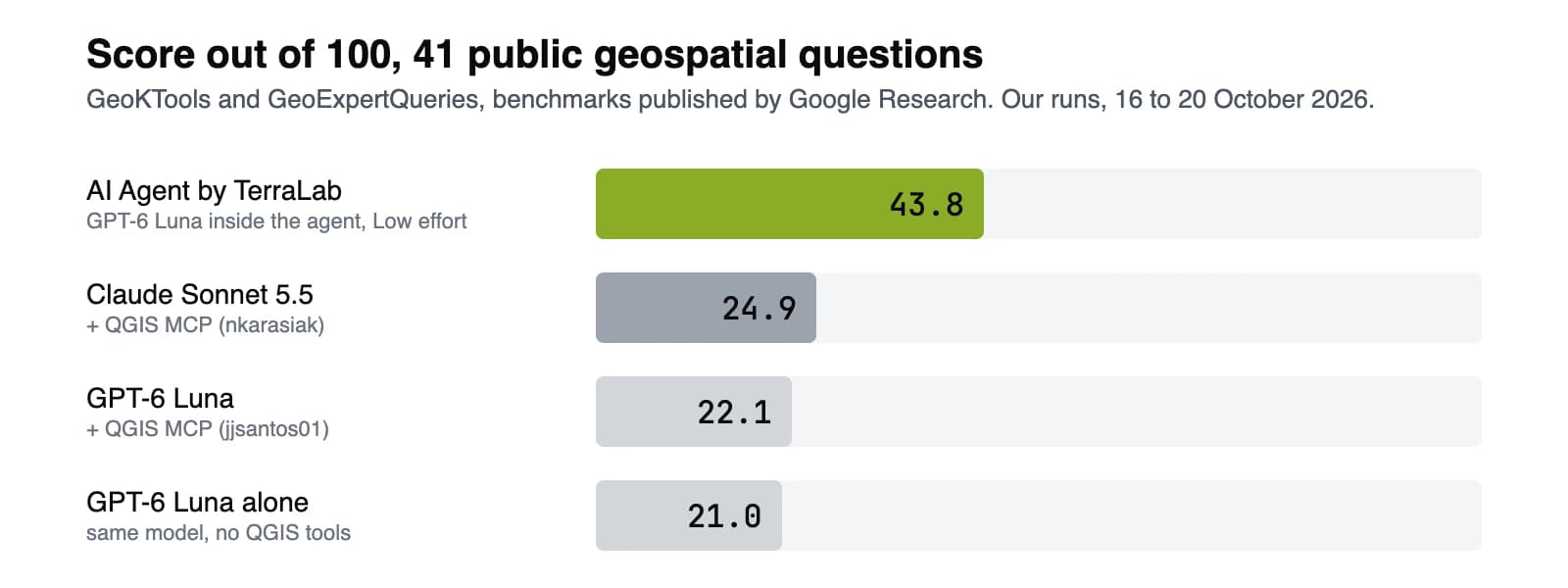
- The result depends on how well the plugin's tools and instructions fit the model you plug in. On the benchmark below, a strong general model driving QGIS through an MCP bridge scored 24.9 out of 100.
3. AI Agent by TerraLab
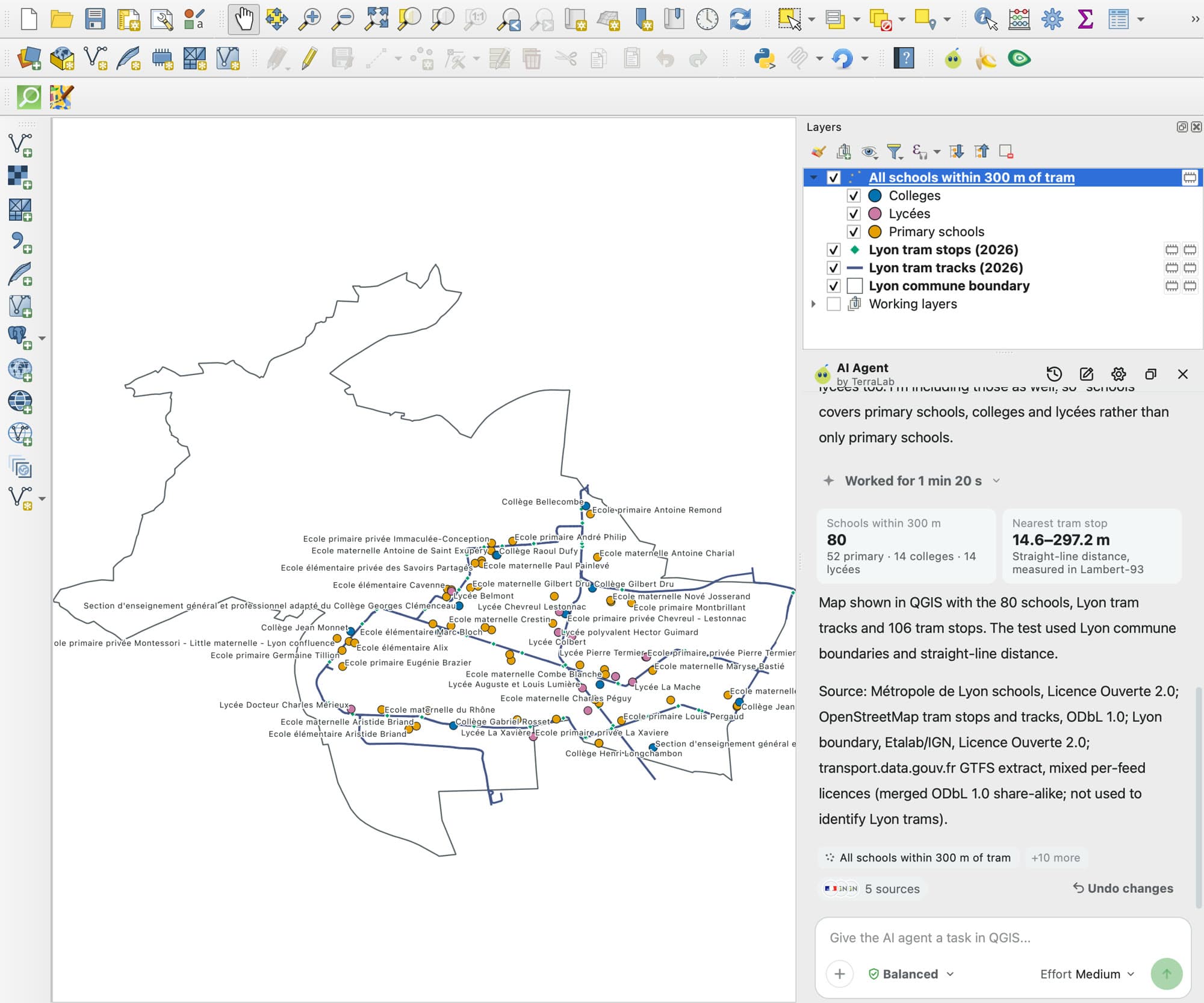
This is ours, AI Agent. It is a chat panel docked in QGIS with the model included: you write the task in plain words, and it finds the data, runs the QGIS tools, styles the layers and checks the map before it answers.
- Made for: a QGIS user who wants a whole task done in the open project, with no key and no second app.
- Not for: a machine with no internet, since the model runs on our service.
- Price: free plan with 5 tasks a month, no card. Pro is €49 a month for 300 tasks. Try Pro free for 7 days: add a card, cancel before the end and nothing is charged.
- Model: included. You pick an effort level, not a provider.
- Install: plugin manager, search AI Agent by TerraLab, sign in. QGIS 3.28 to 4, on Windows, macOS and Linux.
Where it wins
- Multi-step tasks from one sentence: in Lyon it found the official school layers, filtered them by distance, styled the map and counted 80 schools.
- On 41 public questions from GeoKTools and GeoExpertQueries, benchmarks published by Google Research, it scored 43.8 out of 100, the top score of the agents we tested in QGIS (chart below, full benchmark).
- 89 open data sources are built in, it asks before deleting or overwriting, and one click undoes a whole message.
Where it falls short
- It sends your request and a description of the open project to our service in the EU. Your layers and files stay on your machine, but it needs a connection and an account.
Try AI Agent free in QGIS, no card needed
Why pay when the other two look free
Neither of them is free. The ArcGIS assistants are paid for inside the licence, and a plugin with your own key is paid for in model usage, request by request. The real question is what you get for the money.
A key gives you a model. It does not give you the QGIS tools, the instructions, the open data catalogue and the checks that turn a model into an agent. Our benchmark shows the size of that gap: the same model scored 21.0 on its own and 43.8 inside AI Agent.
You also skip the key, the billing account with a model provider and the setup. With the free plan, you can check this on your own project before paying anything.
Questions people ask
Is the ArcGIS AI assistant free?
The assistants that reached general availability are included in ArcGIS user types at no extra cost and do not consume credits, per Esri on 24 June 2026. You still need the paid ArcGIS licence they come with. The ArcGIS Pro assistant was in beta on 28 October 2026, open to eligible ArcGIS Online named users.
Does the ArcGIS Pro assistant work in QGIS?
No. It runs inside ArcGIS Pro 3.7 and needs an ArcGIS Online named user. In QGIS, the equivalent is an AI agent plugin such as AI Agent, installed from the plugin manager.
Is there an AI assistant for QGIS like ArcGIS has?
Yes, several, all as plugins. Some are free and use your own API key or a local model, like AI Copilot and OpenGeoAgent. AI Agent includes the model and has a free plan of 5 tasks a month. AI agents in QGIS compares them.
Can I use my own OpenAI or Claude key in QGIS?
Yes. AI Copilot, OpenGeoAgent and QGIS Agent take a key from OpenAI, Anthropic, Google or DeepSeek, or a local model through Ollama. You pay your provider for each request. To connect Claude from outside QGIS instead, see QGIS MCP.
Is the AI Agent plugin for QGIS 4 made by TerraLab?
Two plugins share the name. Ours is listed as AI Agent by TerraLab and works on QGIS 3.28 to 4, with the model included. The one listed as AI Agent by mzarov is a separate plugin for QGIS 4 that runs on your own API key.
Do I need an API key for AI Agent by TerraLab?
No. The model is included. You install the plugin, sign in, and get 5 free tasks a month.
For the full software comparison, prices over three years included, read QGIS vs ArcGIS Pro. For every AI plugin in QGIS, see the AI for QGIS hub.