Orthophoto vs Orthomosaic: The Difference, and 7 Free for QGIS
Published Updated
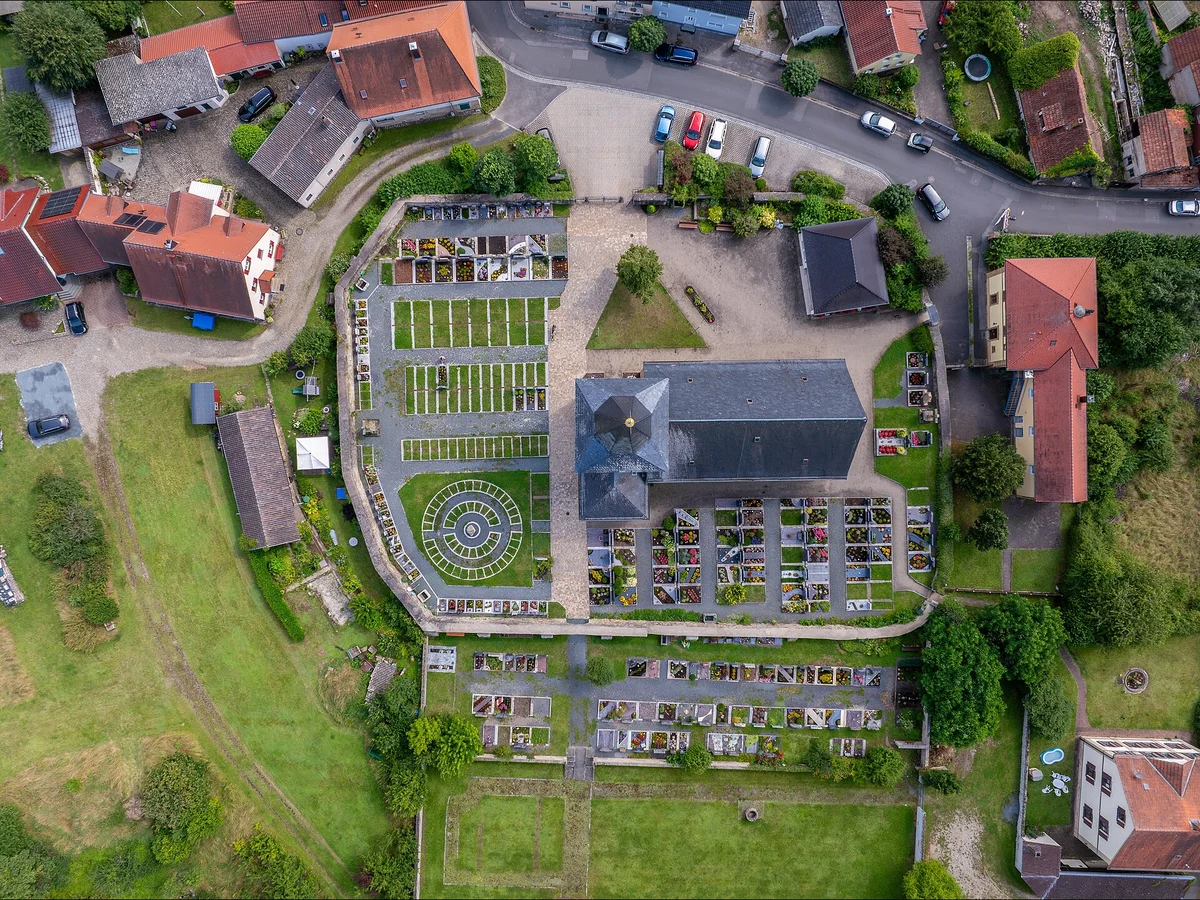
An orthophoto is one aerial or satellite photograph corrected for camera tilt and terrain relief, so its scale is uniform and every point sits at its map position. An orthomosaic is many overlapping orthophotos stitched into one map-accurate image, usually from a drone flight. On either one you can measure distances and areas.
The USGS defines an orthoimage as "a computer-generated image of an aerial photograph in which displacements (distortions) caused by terrain relief and camera tilts have been removed", one that "combines the image characteristics of a photograph with the geometric qualities of a map".
The difference in one line
Every orthomosaic is made of orthophotos. Not every orthophoto is part of a mosaic.
| Orthophoto | Orthomosaic | |
|---|---|---|
| Made from | One photograph | Tens to thousands |
| Typical source | A survey aircraft, a satellite | A drone flight, a national agency |
| Where it goes wrong | Tall buildings lean outward | Seams through cars, colour steps between flights |
| File you receive | One GeoTIFF | One large GeoTIFF, tiles, or a web service |
What is an orthophoto?
An orthophoto, also called an orthophotograph or an orthoimage, is one aerial or satellite photograph that has been orthorectified: its scale is uniform and every point sits at its map position. Orthophotography is the practice of making them, and also the name agencies give the product. Most European languages say ortofoto (Spanish, Italian, Portuguese) or Orthofoto (German).
The USGS lists what the correction buys you: you can measure distances, calculate areas, determine shapes and directions, read accurate coordinates and update maps from the image. A raw aerial photo supports none of these reliably, because its scale changes with the terrain and the camera angle.
Why a raw photo is not a map. A vertical aerial photo is a perspective view: every ray passes through one point, the lens. Ground that stands higher is closer to the camera, so it is drawn larger and pushed away from the point directly under the camera. Penn State's GEOG 160 course calls this relief displacement. It grows with distance from that point and is zero right below it. It is why a straight power-line clearing looks crooked on a photo of hilly ground and straight on a topographic map. Maps and orthophotos are both planimetric, every point seen from directly above. A raw photo is not.
Other names you will meet:
- Orthoimage. The mapping-agency term. The US Federal Geographic Data Committee defines it as a georeferenced image from an aerial photograph or other remotely sensed data, with the metric properties of a map and a uniform scale.
- Orthophotomap. An orthophoto laid out as a map, with a grid, scale, north arrow and title, per Geoawesome. Many people use it as a synonym of the other two.
- Digital orthophoto quadrangle (DOQ). A US raster of rectified aerial photos. Most cover 3.75 by 3.75 minutes, so four make one 7.5-minute quadrangle.
- True orthophoto. An orthophoto with the building lean removed, covered below.
What is orthorectification?
Orthorectification is the correction that turns a photograph into an orthophoto. Esri's GIS dictionary defines it as "the process of geometrically correcting an image to remove relief distortions, sensor artifacts, earth curvature and other perspective distortions, and align the image with coordinates on the ground". It uses ground control points, tie points and elevation data. An image that went through it is orthorectified.
Orthorectified is not the same as georeferenced. Georeferencing only fits an image to coordinates. The QGIS Georeferencer offers linear, Helmert, polynomial, projective and thin plate spline transformations, all fitted to ground control points. None of them reads an elevation model, so a hillside or a tall building stays shifted by the amount it was in the photo. That is fine for a scanned map, which the georeferencing guide covers. For an aerial photo over relief, orthorectify it in photogrammetry software, or download one that was.
How an orthomosaic is made, step by step
Every drone mapping package runs the same chain under different names.
- Fly a grid with overlap. Each spot on the ground has to appear in several photos. Pix4D recommends at least 75% front overlap and 60% side overlap in the general case, and 85% both ways over forests and dense vegetation. DroneDeploy's default is 75% front and 65% side.
- Lay ground control points. These are marked targets whose coordinates you measure on the ground. Pix4D needs at least 3 for them to count, recommends at least 5, and says 5 to 10 are usually enough, spread evenly with one near the centre. Its manual says they reduce the shift from the drone's GPS "from meters to centimeters".
- Align the photos. The software finds feature points in every image, matches them across images into tie points, and solves where each camera was and how its lens distorts. Agisoft's manual calls this aerial triangulation and bundle block adjustment. You will also see it called structure from motion.
- Build a dense point cloud. With the camera positions known, the software matches pixels, not just features, and gets a dense cloud of 3D points.
- Make an elevation model. The points become a grid of heights. A DSM keeps buildings and trees, a DTM keeps only the ground. The DSM vs DTM guide explains which is which.
- Orthorectify each photo. Every photo is projected straight down onto that elevation model. This is what removes tilt and relief.
- Mosaic along seamlines. For each patch of ground the software picks one source photo, draws a seamline where two photos meet and blends colour across it. Metashape lets you edit the seamlines by hand when one cuts through a car or a roof.
The result is usually a GeoTIFF. OpenDroneMap, for example, writes it as odm_orthophoto.tif and its README tells you to open it in QGIS, not an image editor.
Orthomosaic vs photogrammetry
They are not two options. Photogrammetry is the method, the orthomosaic is one of its outputs. ASPRS defines photogrammetry as "the art, science and technology of obtaining reliable information about physical objects and the environment through processes of recording measuring and interpreting images and patterns of electromagnetic radiant energy and other phenomena".
The same drone flight and the same processing run give you several products: the orthomosaic, the point cloud, the DSM and DTM, and often a textured 3D mesh. Ask for all of them. Photogrammetry is also only one way to get heights. The photogrammetry vs LiDAR post compares it with a laser scanner.
Orthomosaic uses on a construction site
On a building site, an orthomosaic is a photo of the whole site that you can measure on, taken on a known day. Every use below comes from the same drone flight.
- Measure on screen. Read distances, areas and perimeters straight off the image: a trench length, a slab area, a fence line. The GSD and accuracy section below says how far to trust them.
- Earthwork and stockpile volumes. The orthomosaic is flat, so it holds no volume. The volume comes from the DSM built in the same processing run. Draw the stockpile outline on the orthomosaic, and the software sums the heights inside it. Cut and fill is the same sum, taken between today's surface and the design level or an earlier flight.
- Progress monitoring. Fly the same grid every week or every month and stack the mosaics. What was dug, poured or delivered shows as the change between two dates.
- Plan against reality. Load the CAD drawing or the site plan over the mosaic in the same CRS. A footing or a road that strayed from the plan shows at once.
- A dated record. The mosaic shows what the site looked like on the day of the flight, before works started or when a contractor left.
| Single drone photo | Drone orthomosaic | Satellite image | |
|---|---|---|---|
| Pixel on the ground | Changes across the frame | A few centimetres, set by flight height | About 30 cm at best, on commercial satellites |
| Measure distances and areas | No, the scale is not uniform | Yes | Yes, at that coarser pixel |
| Measure volumes | No | Yes, with the DSM from the same flight | Only from a stereo pair |
| Date of the image | The day you fly | The day you fly | The next pass with a clear sky |
The satellite resolution comparison lists what each satellite delivers and what it costs.
What the mosaic adds, and what it costs
Step 7 above chooses for each patch of ground which frame to draw it from and blends the boundaries. Three things follow:
- Seams cross moving objects. A car that drove through the site during the flight can appear twice, or as half a car where two frames meet.
- Colour is balanced, not measured. Good for a base map, wrong for anything that reads pixel values as physical quantities, like a vegetation index.
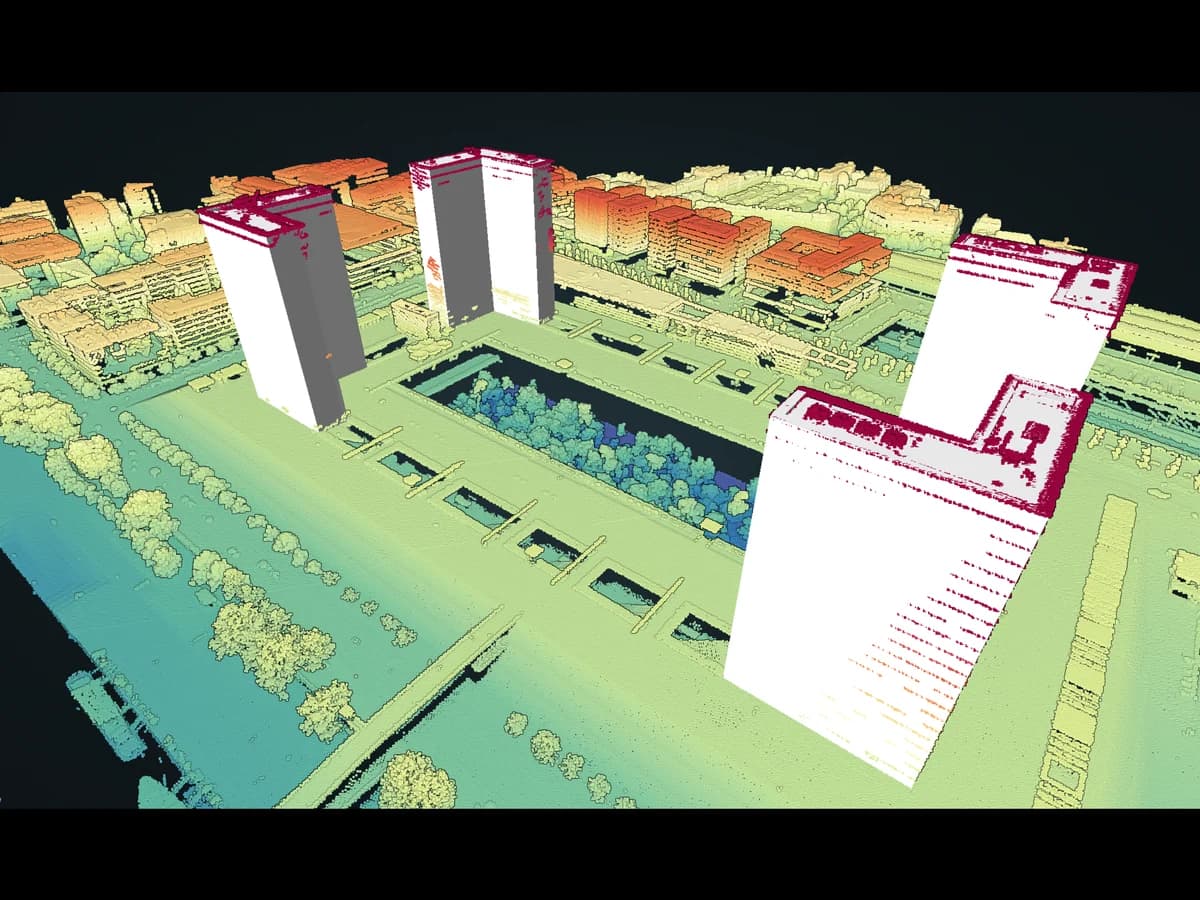
- Tall objects can still lean. When the correction uses a model of the bare ground, anything standing on it keeps the tilt of the frame it came from. A true orthophoto fixes this with a surface model that includes the buildings.
True ortho vs standard ortho. A standard orthophoto is rectified on a DTM, so, as an ISPRS paper on true orthophotos puts it, buildings end up as "leaning buildings and warped bridges". A true ortho is rectified on a DSM. Esri's documentation sums up the result: "no building lean obscuring ground features", so building footprints can be traced correctly. The catch is the ground hidden behind each building in one photo. It has to be filled from a neighbouring photo that saw it, which is why true orthos need more overlap and cost more. Metashape Professional offers both kinds, listed on Agisoft's comparison page as "True / DTM-based orthomosaic generation". The next section measures how far a standard one can be off.
| Standard orthomosaic (DTM) | True orthophoto (DSM) | |
|---|---|---|
| Buildings and trees | Lean away from the camera, may sit off their real position | No lean, facades not visible |
| Seamlines | Edited by hand when one crosses a feature | Automated, no seamline editing |
| Overlap | Works with less overlap | Esri recommends 80% front and at least 60% side |
| Cost and speed | Quick and cheap to produce | More computing, needs very accurate camera positions, slower |
| Best for | Agriculture, mining, natural terrain | Building footprints, change detection, urban planning, utilities |
Esri adds that a standard orthomosaic is poorly suited to dense urban areas with tall buildings, and that lean shrinks with a longer focal length or more overlap. Even a true ortho can ghost moving vehicles.
Not every drone orthomosaic is DTM-based. Geoawesome notes that drone orthomosaics are often built on a surface model derived from the point cloud, which makes them close to a true orthophoto, though usually shot with a camera that is not a calibrated metric camera. Which one you got depends on the software settings.
A normal orthophoto drew Berlin's TV tower 127 m from its base
On Berlin's official spring 2025 orthophoto, the tip of the 368 m TV tower on Alexanderplatz lands about 127 m north-north-west of the tower's foot. On the city's 2024 true orthophoto, same agency and same 20 cm pixels, the sphere sits right on top of the foot.
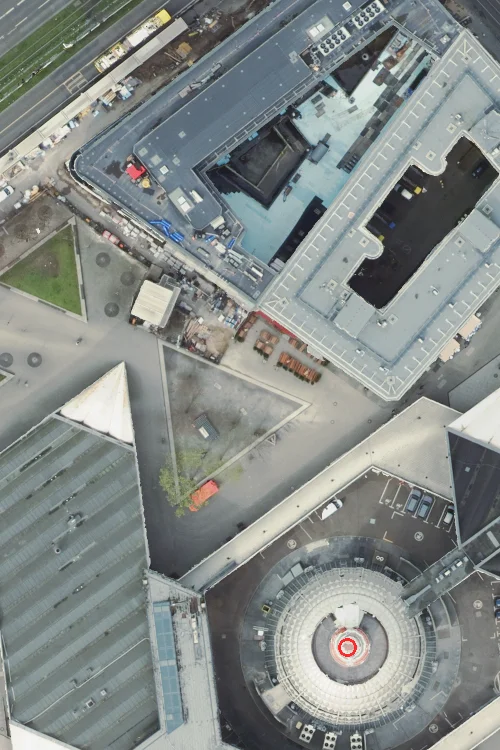
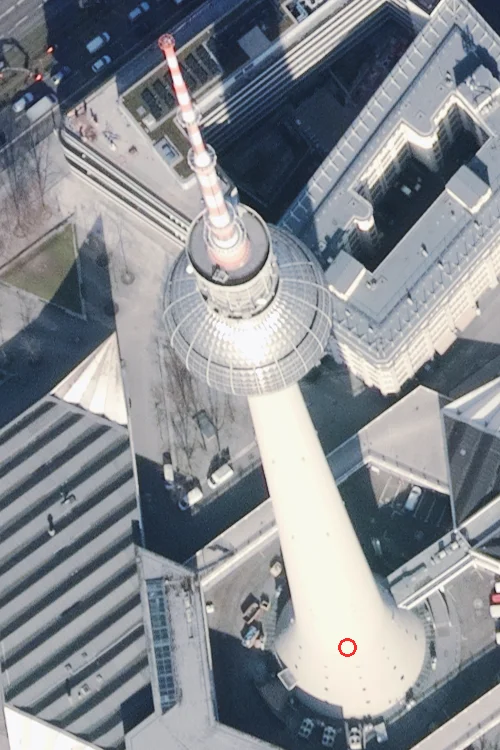
The lean grows with height: about 0.35 m per metre here, so a 20 m apartment block in the same part of the frame would have its roof drawn about 7 m off its footprint. That is arithmetic from the tower, not a second measurement, and it varies across the mosaic with each source frame.
So roofs traced off a normal orthophoto will not sit on the cadastre, and no georeferencing fixes it: the ground is right, the roof is not. Trace where walls meet the pavement, or use a true orthophoto. Spain's service says which you have: on 23 September 2026 it reported "true orthoimage: yes" for Sevilla's June 2025 flight and "no" for Madrid's July 2023 one.
How we checked this. On 23 September 2026 we requested the same window (EPSG:25833, 0.2 m pixels) from Berlin's dop_2025_fruehjahr and truedop_2024 WMS services and read positions by eye on a 1 m grid, to within about 1.5 m. The tower is vertical, so its foot is the sphere's centre in the true orthophoto. Different flight years do not matter for a structure that has not moved. One tower, one spot in one frame: other buildings lean by other amounts.
Free national orthophotos you can load in QGIS today
Seven public services we tested stream orthophotos free into QGIS, from 8 cm pixels in the Netherlands to 60 cm in the United States, and all seven answered on 23 September 2026. Their "latest" layer is rarely one year: France's mixes flights from 2023 to 2026, and the US one still shows 2019 over Times Square.
People ask: of 47 comments about orthophotos in 1,692 YouTube comment threads on QGIS tutorials we collected, 7 ask where to find or load one, behind how to make one (8) and how to classify one (8).
| Country, service | Pixel | Newest imagery (checked 23 Sep 2026) | Licence, as the provider states it | URL to paste in QGIS |
|---|---|---|---|---|
| France, IGN BD ORTHO | 20 cm | By département: 24 of 96 mainland départements still 2023, 35 from 2024, 35 from 2025, 2 from 2026 | Licence Ouverte (Etalab) | https://data.geopf.fr/wmts?SERVICE=WMTS&REQUEST=GetCapabilities, layer ORTHOIMAGERY.ORTHOPHOTOS |
| Spain, IGN PNOA | 15 or 25 cm | Madrid July 2023, Barcelona July 2024, Sevilla June 2025 | CC BY 4.0 scne.es | https://www.ign.es/wms-inspire/pnoa-ma, layer OI.OrthoimageCoverage |
| Netherlands, PDOK Luchtfoto | 8 cm | 2026 | CC BY 4.0 | https://service.pdok.nl/hwh/luchtfotorgb/wmts/v1_0, layer Actueel_orthoHR |
| Switzerland, swisstopo SWISSIMAGE | 10 cm, 25 cm over the Alps | 3-year update cycle | Free use, source reference mandatory | https://wmts.geo.admin.ch/EPSG/3857/1.0.0/WMTSCapabilities.xml, layer ch.swisstopo.swissimage |
| Austria, basemap.at | 29 cm, 15 cm in some regions | Updated yearly | Open Government Data Österreich, CC BY 4.0 | https://mapsneu.wien.gv.at/basemap/1.0.0/WMTSCapabilities.xml, layer bmaporthofoto30cm |
| Germany, Berlin TrueDOP | 20 cm, true orthophoto | 2024 | Datenlizenz Deutschland Zero 2.0 | https://gdi.berlin.de/services/wms/truedop_2024 |
| United States, USGS NAIP | 60 cm | Times Square and Chicago Loop August 2019, San Francisco May 2022 | Public domain (USDA) | https://imagery.nationalmap.gov/arcgis/services/USGSNAIPImagery/ImageServer/WMSServer |
In QGIS, open Layer > Add Layer > Add WMS/WMTS Layer, click New, paste the URL, Connect and pick the layer. For offline work, right-click the layer, Export > Save As, and QGIS writes the extent you set to a GeoTIFF.
 , open Layer > Add Layer > Add WMS/WMTS Layer, click New, paste the URL, Connect and pick the layer. For offline work, right-click the layer, Export > Save As, and QGIS writes the extent you set to a GeoTIFF.
Check the date under your own site before you measure. IGN keeps a table of flight years by département. PNOA answers the Identify tool on its OI.MosaicElement layer with month, pixel size and true-orthophoto flag. The US service lags NAIP's own archive, which holds July 2023 over Chicago and August 2023 over Manhattan.
How we checked this. On 23 September 2026 we requested each service's capabilities document and one image over a named landmark: fourteen requests, all HTTP 200. Dates come from each service's metadata: IGN's table of 21 September 2026, PNOA's feature info, the USGS footprints and the NAIP collection on Microsoft Planetary Computer. The list leans on Europe. Germany has one service per state, and we found no openly licensed national one for India or Brazil: India's Bhuvan portal says its imagery is "provided for viewing purposes only".
Which one you have
- A drone deliverable is an orthomosaic, and the vendor says so.
- IGN BD ORTHO, USGS NAIP, Ordnance Survey imagery are national orthomosaics published under the singular word.
- Google Satellite, Bing, Esri World Imagery in QGIS are mosaics of mosaics, with dates that change from one tile to the next.
The words are used interchangeably at the counter and differently in the workshop.
GSD and accuracy: the two numbers to ask for
Ground sampling distance (GSD) is the size of one pixel on the ground. Pix4D's example: a GSD of 5 cm means one pixel covers 5 cm by 5 cm. Fly higher and the GSD grows. It says how much detail you can see.
Accuracy says how far a point in the image is from its real position. It is a separate number. A mosaic can have 2 cm pixels and still sit a few metres off, if it was placed only with the drone's own GPS. Relative accuracy (a distance measured inside the mosaic) is usually good. Absolute accuracy (a coordinate compared with the real world) is where ground control points earn their keep.
When you receive an orthomosaic, ask for the GSD, whether ground control points were used, and the error measured on check points: surveyed points that were kept out of the processing to test it. Pix4D recommends measuring extra points for exactly that.
Software that makes orthomosaics
| Software | Kind | What it does, as the maker states it |
|---|---|---|
| OpenDroneMap (ODM) | Free, open source (AGPL-3.0), command line | Point clouds, 3D models, orthorectified imagery and elevation models, on Windows, Mac and Linux; OpenDroneMap Desktop adds a graphical interface |
| WebODM | Free, open source (AGPL-3.0), graphical interface | Georeferenced maps, point clouds, elevation models and 3D models; now a separate project from OpenDroneMap, processing with its own ODX engine |
| PIX4Dmapper | Commercial, desktop | Point clouds, DSMs, meshes and orthomosaics, with ground control points; online processing through PIX4Dcloud |
| Agisoft Metashape | Commercial, desktop, 30-day free trial | DSM, DTM, true or DTM-based orthomosaics and ground control in the Professional edition |
| DroneDeploy | Commercial, cloud | Flight planning in the app, then you upload the photos and its processing pipeline builds the map |
Using an orthomosaic in QGIS
- Load it. Drag the GeoTIFF into the map, or use Layer > Add Layer > Add Raster Layer.
- Check the CRS. Right-click the layer, Properties > Information shows the coordinate reference system and the pixel size. The QGIS manual says to change it on the Source tab only if it is wrong or missing; to reproject, save a new file. The CRS guide covers the rest.
- Build pyramids. A drone mosaic can be several gigabytes and slow to pan. The same manual explains that lower-resolution copies, called pyramids or overviews, mean "performance can be considerably improved". Build them from the Pyramids tab of the layer properties, or with Raster > Miscellaneous > Build Overviews.
- Put it to work. Draw boundaries and measure on it directly. Extract buildings, trees or cars as polygons with AI Segmentation, click an object and it returns its outline. The tree canopy guide walks through one full example. Turn the mosaic into a clean, flat site plan with AI Edit, which returns a georeferenced image aligned to the source. And if you would rather ask in plain words than hunt through menus, AI Agent loads data, runs the analysis and styles the layers for you.
Which one for which job in QGIS
- Measuring and drawing. Either, as long as you know the ground pixel size. A 20 cm national mosaic is fine for a site boundary. A 2 cm drone mosaic is what you want for kerbs and manholes.
- Extracting objects with a model. Either. AI Segmentation, the plugin we make at TerraLab for QGIS, runs on whatever raster is visible on the canvas. Watch the seams: a building split across one can come out as two polygons. The building footprint guide shows why ground pixel size matters more than the source.
- Anything radiometric. Neither. Go back to the single frames or to a reflectance product.
Questions people ask
How much overlap does an orthomosaic need?
For a standard map, 75% front and 60 to 65% side, per the Pix4D and DroneDeploy figures above. Raise it over forests, crops and water, which look alike from frame to frame.
What is an orthomosaic map?
An orthomosaic loaded as a map layer: the same georeferenced image, used as the base in a GIS or a web map, where you measure distances and areas and draw on top. Drone software often delivers it under that name. The pixel size and the accuracy figures from the GSD section still tell you what the map is good for.
Is an orthomosaic georeferenced?
Yes. It carries a coordinate system and a ground pixel size, which is what makes it an orthomosaic rather than a panorama. Check the CRS when you load it, QGIS reprojects on the fly.
Can I make an orthomosaic in QGIS?
Not from raw photographs. QGIS has no photogrammetry engine. OpenDroneMap is free and does it, and the WebODM Precisa Agrimensura plugin uploads the photographs to a WebODM server from QGIS and loads the orthomosaic back.
What is the difference between a topographic map and an orthophoto?
A topographic map is drawn: contours, symbols and names. An orthophoto is a photograph. Both are planimetric, with a uniform scale, which a raw aerial photo is not. Agencies lay roads and other vector data over orthophotos and edit them to match what the image shows.
What is ortho mapping?
Making maps from orthorectified imagery: fly with overlap, align the photos, build an elevation model, orthorectify each frame, then mosaic. The step-by-step section above walks through it.
Is an orthomosaic a true orthophoto?
Not always. A standard orthomosaic is rectified on a bare-ground model and keeps some building lean. One built on a surface model is close to a true orthophoto. See the table above.
Which ground pixel size do I need?
Enough that the smallest thing you care about spans several pixels. A manhole cover needs 5 cm. A house needs 50 cm. A field needs 10 m.
The QGIS AI hub collects what AI can and cannot do inside QGIS. The other pair of words that arrives with every drone deliverable, DSM vs DTM, has its own page.