AI GIS: What It Does Today and Which Tool to Use
Published
AI GIS is GIS software where a trained model does part of the work: it reads imagery and returns objects, or it takes a request in plain words and runs the steps a GIS analyst would. The output is still ordinary GIS data, a layer in a known coordinate system that you open, check and edit.
The useful correction is that AI GIS is not one product. It is five different jobs, and most tools do only one of them. A tool that finds every roof in an aerial photo will not build your map layout, and a chat assistant that styles a layer cannot see a single tree in your imagery.
I build two of the tools named below, for QGIS. Read this knowing whose article it is.
The five jobs, at a glance
| Job | You give it | You get back | Tools that do it in 2026 |
|---|---|---|---|
| Extract objects from imagery | An aerial, drone or satellite image and a word | One polygon per building, tree, panel or pool | AI Segmentation (ours), GeoAI, ArcGIS pretrained models, Mapflow |
| Classify land cover | Imagery and a few training areas | Every pixel labelled water, built, forest, crop | Google Earth Engine, dzetsaka in QGIS, ArcGIS |
| Run a GIS task from a sentence | A request and the project you have open | Data found, tools run, map styled | AI Agent (ours), ArcGIS AI assistants, Atlas, Felt, Kue |
| Write GIS code | A question about PyQGIS, GDAL or SQL | A script you run yourself | ChatGPT, Claude, Gemini |
| Connect a chatbot to GIS | An MCP client such as Claude | The chatbot calls GIS tools and data | QGIS MCP (open source), TerraLab MCP (ours) |
Pick the row by the work you are paid for, not by the brand. A planning consultant who loses two hours per report on maps needs row three. A survey team digitising roofs for a city needs row one.
How I sorted them
I placed each tool in the job its own pages say it does, read on 28 October 2026. I left out tools that only promise a job on a roadmap. Prices are list prices for one person, before tax.
We make AI Agent, AI Segmentation and the TerraLab MCP, so I know their limits better than the others'. One case where I would not start with ours: if your team works in a browser and nobody runs QGIS, a browser GIS such as Atlas or Felt fits that team better, because ours lives inside QGIS.
1. Extracting objects from imagery
This is the oldest job and the one with the clearest output. A segmentation model has learned what a roof, a crown or a solar panel looks like, and it draws one polygon per object. You review the result, delete the misses, and keep a layer with an area on every feature.
The choice comes down to where it runs. GeoAI is free under the MIT licence and runs on your own machine, which means a Python environment and, in practice, an NVIDIA card. ArcGIS pretrained models run inside ArcGIS Pro. Mapflow and AI Segmentation run on remote servers, so they work on a laptop with no graphics card.
The detailed guide to building footprints runs the same job four ways, from free to paid.
2. Classifying land cover
Here every pixel gets a class instead of every object getting a shape. You draw a few training areas for each class and a classifier labels the rest of the scene. Google Earth Engine does it at continental scale and is free for research and non-commercial use. Inside QGIS, the dzetsaka plugin ships Random Forest and SVM classifiers.
This job is mature and mostly not new AI. It is the right tool when you need percentages per class across a region, and the wrong one when you need countable objects.
3. Running a GIS task from a sentence
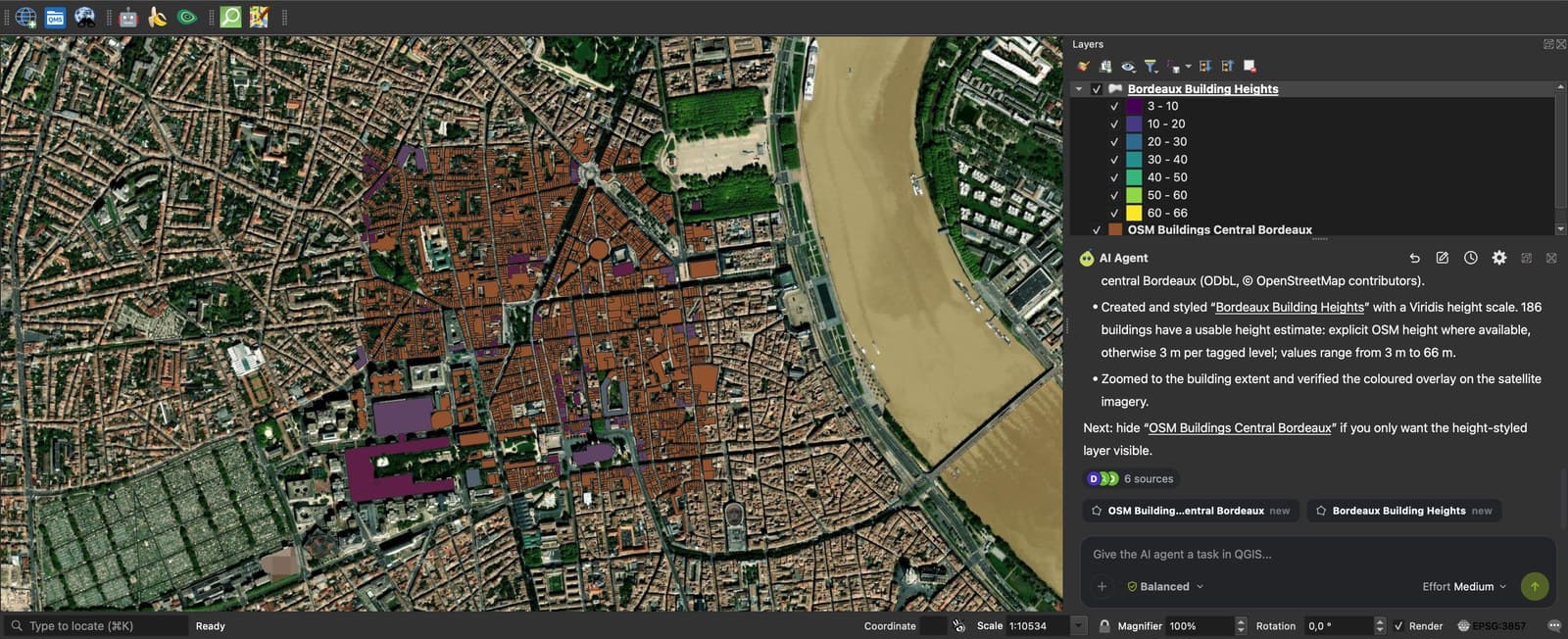
This is the newest row and the one most people mean when they search for AI GIS. You describe the result, and an agent finds data, runs the geoprocessing tools and styles the map, step by step, in a project you can inspect.
The tools split by where your data lives:
- ArcGIS AI assistants: in June 2026 Esri made part of its assistants generally available, included in ArcGIS user types with no credits spent. Others, the ArcGIS Pro assistant among them, are still in beta.
- Atlas: a browser GIS whose assistant, Navi, builds maps from a conversation. The free plan includes 10 Navi runs, Pro is 23 USD per user a month.
- Felt: a browser GIS with AI credits from its Team plan, 199 USD a month for three seats.
- Kue by Bunting Labs: an assistant for QGIS, from 29 USD a month.
- AI Agent: ours, a QGIS plugin. It works in the project you have open, shows each step, and one click undoes the whole task. It needs QGIS 3.28 or later and no GPU.
Whichever you pick, judge it on a task you already know the answer to. An agent that gets your own last report right is worth more than a demo.
4. Writing GIS code with a chatbot
General chatbots write PyQGIS, GDAL commands and PostGIS queries well, and they are where most GIS people first used AI. The limit is that the chatbot never sees your layers. It guesses field names and coordinate systems, so the code often fails on the first run and you fix it by hand.
I tested this on three common tasks in ChatGPT for QGIS, including the prompt that works better than the one most people write.
5. Connecting a chatbot to GIS tools
The Model Context Protocol (MCP) lets a chatbot such as Claude call outside tools. A GIS server for MCP gives it geocoding, open data, imagery or a live QGIS project, so it stops guessing and reads the real data.
The open-source QGIS MCP connects Claude to a running QGIS and is free. Our MCP gateway gives any MCP client geodata tools without a local install. The QGIS MCP guide shows the setup, step by step.
Where AI GIS still fails
- Closed canopies and dense blocks. When crowns or roofs touch, a model returns one large shape instead of many. Check a dense sample before you count.
- The coordinate system. Chat tools that do not read your project pick a CRS for you. Always check the layer's CRS before you measure an area.
- The judgement in a report. An agent can produce the map. It does not know your client's rules, and nothing in it replaces a site visit.
Questions people ask
Is there a free AI GIS?
Yes, for every job above. GeoAI and the QGIS MCP are open source, Earth Engine is free for non-commercial work, and Atlas, Felt and our plugins have free plans. Free local tools cost setup time and a graphics card instead of a subscription.
What is the difference between AI GIS and GeoAI?
GeoAI usually means the models: machine learning trained on imagery, point clouds and other geographic data. AI GIS is the software you use that runs those models, plus assistants that run ordinary GIS tools for you. What is GeoAI covers the models in detail.
Can ChatGPT do GIS analysis?
It can write the code and explain the method, and with a plugin or an MCP server it can run tools. Without one, it cannot open your layers, so it works from your description of them.
Will AI replace GIS analysts?
Not the people who decide what the map should show. It takes over the repetitive steps: digitising, data searches, styling. I looked at the jobs most exposed in Will AI replace GIS jobs?.
Does my data leave my computer?
It depends on the tool. Local tools such as GeoAI keep everything on your machine. Cloud segmentation sends the imagery tiles it reads. Agents send your request and the information the model needs about your project. Ask each vendor which of these applies before you use client data.
For the QGIS side of this list, the QGIS AI plugins page shows what each plugin needs to run, and the best AI plugins for QGIS compares eight of them.